

What's new in Flutter 3.50
Investing in Flutter's next decade


Flutter 3.50 is fully baked and ready to serve alongside
Dart 3.14.
This release brings a set of updates that showcase where Flutter is headed next.
Direct native interop is now stable,
letting you call between Dart and native platform APIs.
Faster WebAssembly across Safari and Firefox,
alongside browser-native text layout,
gives Flutter web apps a major speed boost.
We've also expanded our platform embedder APIs for custom hardware,
and now the standalone material_ui and cupertino_ui packages
are the default for new projects.
As always, we couldn't do any of this without the Flutter community
and all of your contributions across the framework and ecosystem.
In this release cycle alone, 188 contributors, including 69 first-time
contributors, landed over 1,200 commits.
So, run flutter upgrade in your terminal to get the latest release,
or read on to explore what's new.
Direct native interoperability
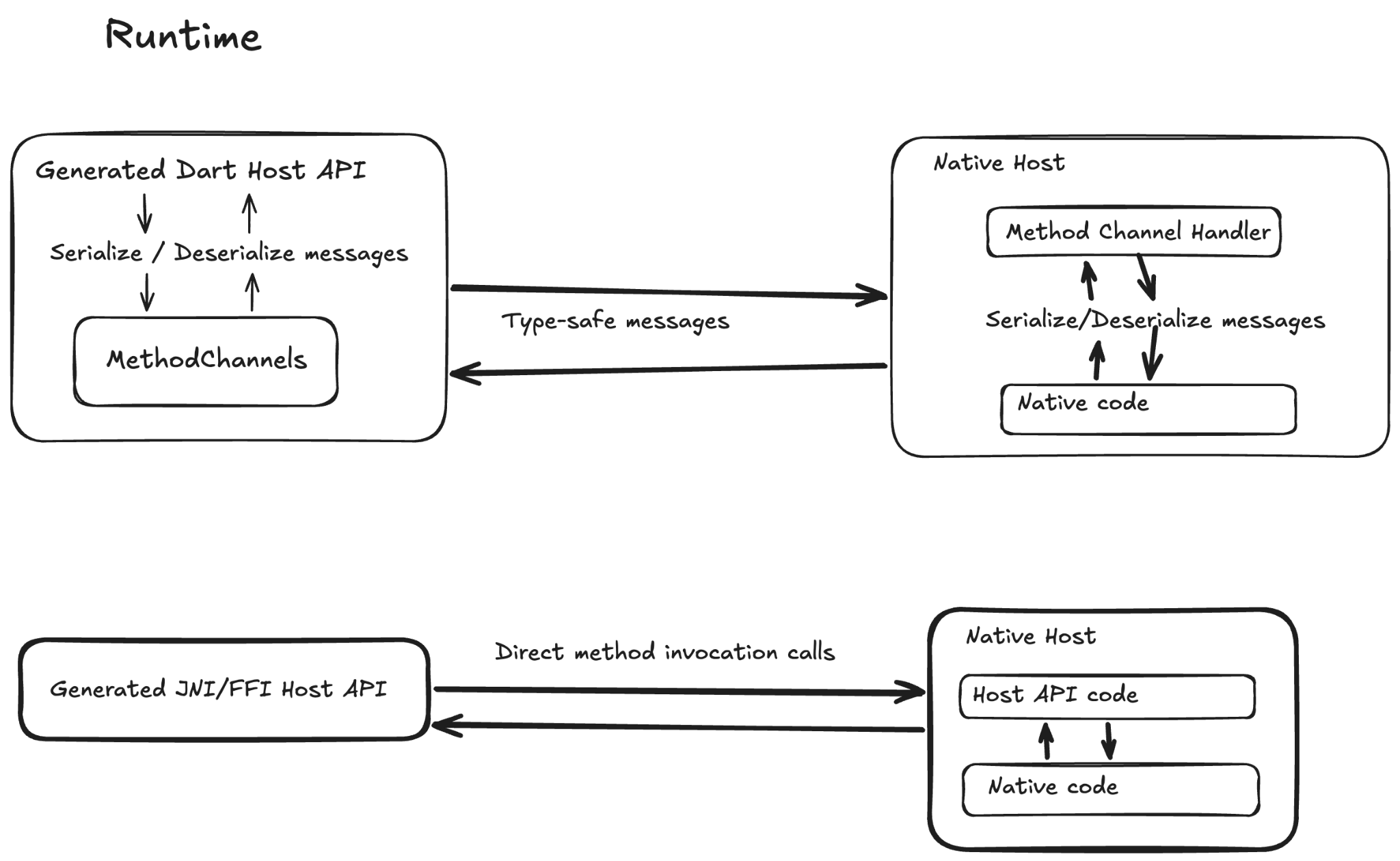
Last year, we shared our vision for direct native interoperability to eliminate the serialization overhead, string-based plumbing, and mandatory async latency of traditional platform channels. In Flutter 3.50, that multi-year investment reaches production readiness: FFIgen for Objective-C and JNIgen for Java and Kotlin join FFIgen's long-standing C support as stable. You can also preview Pigeon's new native interop mode, which uses both generators to create type-safe bindings under the hood.
For any native integration, you can now skip platform-channel message passing and call between Dart and platform code directly, including synchronously or from background isolates. Use FFIgen to bind C and Objective-C APIs, or use JNIgen to bind Android system APIs and custom Java or Kotlin libraries in your Flutter and Dart apps. When building multi-platform plugins, Pigeon's native interop mode handles data conversion and native lifetimes automatically on iOS, macOS, and Android.
Thank you to all the package authors, contributors, and Early Access Program participants, especially Jon Holtan, Rody Davis, Dominik Roszkowski, Alexander Thiele, and Morgan McKenzie. These community members tested early builds, reviewed documentation, and helped shape these APIs. Stay tuned for a dedicated post on direct native interop.
Learn more: Native interop documentation
Web platform
On the web, Flutter 3.50 pairs faster cross-browser WebAssembly execution with built-in asset cache busting, modern JS interop checks, and smaller, browser-native text rendering.
WebAssembly on Safari and Firefox
Running flutter build web --wasm compiles your app
to both WebAssembly and JavaScript,
falling back to JavaScript automatically on older browsers.
Chromium-based browsers (Chrome and Edge 137+)
already run WebAssembly by default.
In Flutter 3.50, Safari 26.2+ (macOS and iOS) and Firefox 147+
deliver over 2x the frame rate of JavaScript on heavy widget benchmarks,
and you can opt in today using web/flutter_bootstrap.js
before they become enabled by default in a future stable release:
{{flutter_js}}
{{flutter_build_config}}
_flutter.loader.load({
  config: {
    wasmAllowList: {
      blink: true,
      webkit: true,
      gecko: true,
    },
  },
});
Learn more: Support for WebAssembly (Wasm)
Built-in web content hashing
Deploying an updated Flutter web app can leave returning users
with stale JavaScript or mismatched assets cached in their browser.
Passing --web-content-hash to flutter build web solves this
by embedding content hashes into your compiled JavaScript, WebAssembly,
and build/web/assets/** filenames
and updating flutter_bootstrap.js automatically.
That lets you cache hashed app bundles and assets for up to a year
(Cache-Control: public, max-age=31536000, immutable)
while keeping index.html and flutter_bootstrap.js on no-cache
so every deploy loads cleanly.
The flag also generates build/web/precache_manifest.json
for custom service workers and Workbox pipelines,
replacing the deprecated flutter_service_worker.js tokens.
Learn more: Web content hashing and HTTP caching
Auditing legacy JS interop on web
Flutter web apps and plugins use JS interop libraries
to access browser features like local storage
or wrap third-party JavaScript SDKs.
Dart's older JS-only libraries
(dart:html, dart:js, dart:js_util, and package:js)
are now deprecated in favor of dart:js_interop and package:web.
These modern replacements work across both JavaScript and WebAssembly builds,
and the legacy libraries will be removed in a future Dart release.
Pass --no-deprecated-js-interop to flutter build web,
flutter run, or flutter test --platform chrome
to catch outdated JS imports.
This fails the build early if your app or any of its packages
still depend on legacy browser libraries,
helping you prepare for WebAssembly.
Learn more: Using compatible JS interop libraries and Announcing Dart 3.14
Native browser text layout preview
Built in collaboration with the Chrome team
on Chrome's experimental Enhanced TextMetrics API,
WebParagraph lets the browser shape operating-system fonts
directly on the canvas instead of bundling C++ font parsers.
Delegating text layout to the browser shrinks the CanvasKit download
(to roughly 3.75 MB, down from 5.46 MB),
eliminates network requests for fallback fonts,
prevents missing-character tofu boxes across international scripts,
and renders native color emojis.
Learn more: WebParagraph experimental preview (#172561)
Pluggable platforms
Following up on our
Google I/O Pluggable Platforms announcement,
we're continuing to make Flutter easier to port
to new operating systems and hardware.
In Flutter 3.50, we closed two key gaps
in the underlying Impeller and Vulkan embedder APIs.
Community contributor xiaowei-guan
added Vulkan external texture support so custom embedders can
pass textures directly to the engine
for sampling across Impeller and Skia backends.
Custom embedders can now invoke FlutterEngineNotifyLowMemoryWarning to
purge Impeller's offscreen render target cache
immediately under memory pressure.
Decoupled design packages
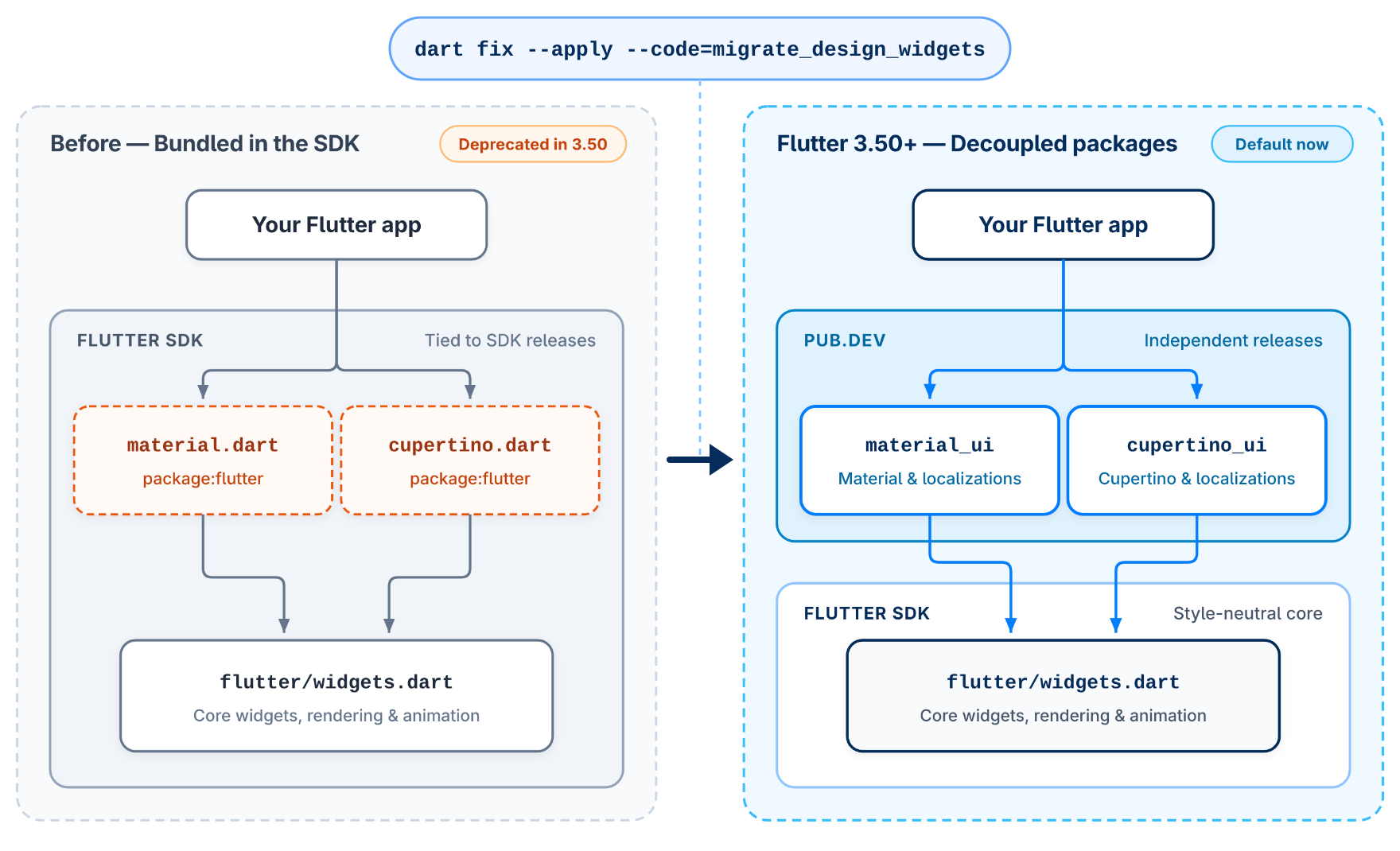
Following the 1.0 launch of standalone material_ui and cupertino_ui
in Flutter 3.47, Flutter 3.50 formally deprecates the coupled
package:flutter/material.dart and package:flutter/cupertino.dart
libraries
alongside their localization delegates in package:flutter_localizations.
New projects created with flutter create now import
package:material_ui by default.
material_ui
and
cupertino_ui
packages using
dart fix
.
Run dart fix --apply --code=migrate_design_widgets
to update existing imports and localization delegates automatically.
Learn more: Material and Cupertino migration guide and Decoupling Material and Cupertino
Framework
Across the core framework, community and team contributions add sliver clipping widgets, steadier text selection, logical image caching, accessibility improvements, and desktop multi-window updates.
Scrolling and slivers
Community contributors delivered standout upgrades
for custom scroll views in Flutter 3.50.
Emmanuel Lefebvre Dibon added
SliverClipRect and SliverClipRRect with a clipOverlap
option
to round or clip scrolling sections without cutting off pinned headers.
Mairramer added itemExtentBuilder
to ListView.separated so lists with dividers
can size variable-height rows on demand without building offscreen widgets.
Mairramer also introduced ScrollPhysics.shouldUpdate
so apps can update scroll behavior dynamically
when configuration settings change.
Soroush Yousefpour updated
RawScrollbar.mouseCursor to change the mouse pointer
only over the scrollbar thumb and track,
keeping the standard cursor over nearby content.
Framework fixes now stop Scrollable.ensureVisible
at the exact offset needed to reveal a pinned header
instead of scrolling past it.
SliverFillRemaining now calculates overscroll stretch offsets accurately
at the end of a scroll view.
Finally, TreeSliver clips expanding and collapsing branches cleanly
so animated child rows never overlap neighboring items.
SliverClipRRect rounds and clips scrolling sections without cutting off pinned headers.Text input and selection
Text editing and selection are now noticeably steadier
across mobile, web, and desktop.
Alex Li added a password option
to TextInputType.numberWithOptions
so Android apps can open a secure numeric keypad for PIN entry.
Android apps can also use AutofillHints.emailOTPCode
to autofill one-time verification codes from email.
A new Hyphens enum lets you control whether soft hyphens
appear visibly when words wrap across lines.
Nicodemus Lin stopped the screen from jumping
when users drag the top selection handle in multi-line text.
Nickolas de Luca Alberton fixed
up and down arrow-key cursor movement
in centered and right-aligned single-line text fields.
Dragging to select text inside a PageView
no longer flips accidentally to neighboring pages.
Selection handles also stay pointed toward the selected text
when mixing left-to-right and right-to-left scripts.
Image and painting APIs
Community contributors also rounded out
Flutter's image loading and caching APIs.
Kishan Rathore added
a placeholder ImageProvider to DecorationImage
so container backgrounds can display a fallback image while loading.
Anas Saifi added
FadeInImageTransition.fadeInOver to fade images smoothly
over opaque placeholders without a blank flash.
Koji Wakamiya added
useLogicalSize on ResizeImage and useLogicalCacheSize
on Image
to scale cached images to screen density without needing a BuildContext.
Ishaq Hassan exposed blendMode
on RawImage
so custom widgets can apply color blending effects directly
when drawing an image.
Custom BoxBorder shapes now transition smoothly
between states during animations.
Color animations using HSVColor.lerp and HSLColor.lerp
now take the shortest path around the color wheel,
avoiding unexpected color shifts.
DecorationImage.placeholder
displays a fallback image while container background images load.
Accessibility and navigation
Flutter 3.50 improves keyboard navigation, screen-reader support,
and dialog customization across platforms.
Custom slider widgets can now use SemanticsRole.slider
so screen readers announce their values and controls accurately.
Apps can check MediaQueryData.reduceMotion
to detect the user's Reduce Motion setting
and swap slide animations for gentle fades.
Pressing Escape now closes open Tooltip and RawTooltip overlays
without moving keyboard focus, meeting web accessibility standards.
On web, VoiceOver and WidgetsApp.router fixes
keep screen-reader and keyboard focus steady inside overlays
instead of resetting unexpectedly.
A new skipTraversal option on FocusableActionDetector
from Ishaq Hassan
lets custom interactive widgets opt out of Tab-key navigation.
For dialogs, a new barrierBuilder callback on showDialog
from Mairramer
lets you customize modal backdrops, such as adding background blur.
Finally, Navigator.popUntilWithResult now returns its result
to the last popped route,
even when the destination route has local history entries.
Desktop windowing
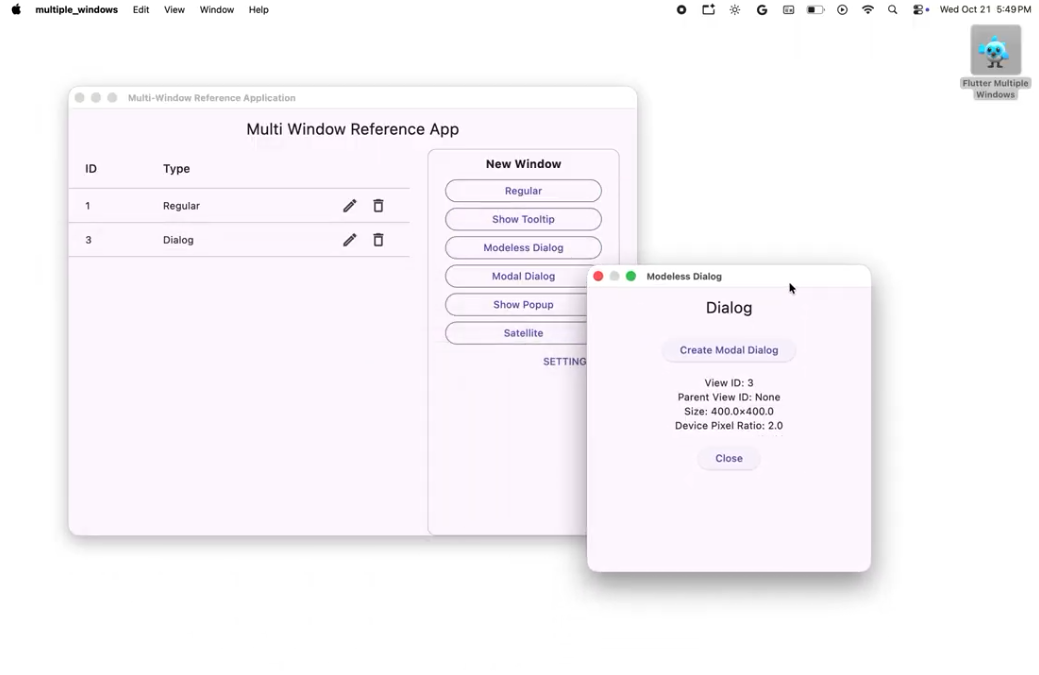
In partnership with Canonical, and thanks to maintainers
Robert Ancell,
Matthew Kosarek,
and Matej Knopp,
Flutter's experimental multi-window desktop APIs
continue to mature across Linux, macOS, and Windows.
On Linux, apps can build custom title bars, transparent windows,
and native drag-to-move or resize controls using WindowControllerLinux.
On macOS, windows and dialogs can size themselves
to fit their content before appearing,
preventing a visible resize flash on launch.
Across all three desktop platforms,
RegularWindow is now named Window for simpler multi-window code.
Its shrinkWrap property also replaces sizedToContent
to match Flutter's familiar layout naming.
Finally, WindowManager now sits above WidgetsApp
so secondary windows can run their own independent UI and navigation state.
Engine
Under the hood, Flutter 3.50 expands Impeller's hardware-accelerated primitive rendering, improves mobile GPU stability, and upgrades Windows and Linux graphics fidelity.
Impeller rendering
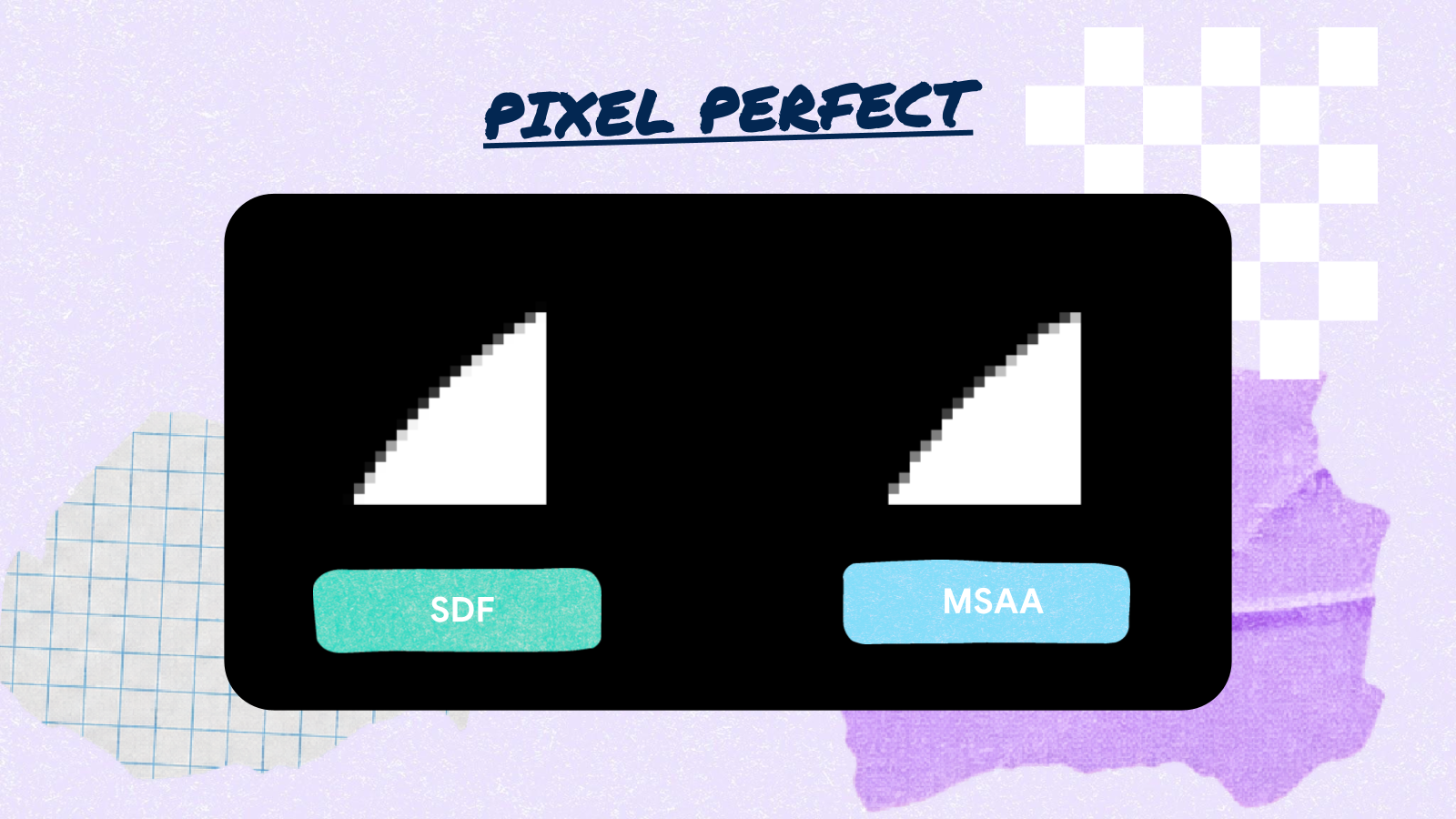
Impeller's Signed Distance Field (SDF) renderer for macOS, Linux, and Windows draws sharp borders, shapes, and gradients directly on the GPU instead of calculating complex geometry on the CPU. This lowers frame render times and keeps scrolling and animations smooth, even on screens packed with cards, borders, and shadows. Flutter 3.50 extends this fast path to lines, thin borders, rounded corners, and gradients, while speeding up macOS gradients and repeated text shadows. For custom 3D scenes and 2D games, Flutter GPU adds support for 2D texture arrays. Game and graphics developers can now batch sprite sheets, tilemaps, and terrain layers into fewer draw calls without visual seams between tiles. Flutter GPU also reports clearer Dart error messages when a shader pipeline is misconfigured, helping you catch and fix graphics bugs faster.
Community contributors also landed high-impact OpenGL startup and GPU stability fixes. xiaowei-guan moved OpenGL shader setup to a background thread so apps display their first frame faster. seunggi resolved Mali GPU crashes when loading textures, preventing unexpected app exits on affected Android devices. krll-kov fixed OpenGL ES 2 texture rendering on older devices and preserved transparency across frames in animated images. Flutter also falls back automatically from Vulkan to OpenGL on B-series PowerVR GPUs to prevent rendering glitches.
Desktop graphics
On Windows and Linux, desktop rendering picks up key fidelity and performance upgrades. The Windows engine now requests OpenGL ES 3 by default while retaining automatic OpenGL ES 2 fallback support, unlocking modern graphics features without dropping older PCs. Windows apps can now load assets and files from paths with non-ASCII characters, such as international usernames or folder names. Windows also renders crisper text with improved contrast and skips an extra full-screen copy each frame to reduce GPU overhead. On both Windows and Linux, improved anti-aliasing smooths jagged edges on layered UI elements and custom shapes.
iOS and macOS
As our first stable release since Xcode 27 and iOS 27 shipped, Flutter 3.50 cuts iOS touch latency, smooths physical-device debugging, and continues moving off CocoaPods and Intel Macs.
Faster iOS touch response
A major rework of how the engine schedules frame generation following iOS touch events, contributed by community member Matej Knopp, delivers touch events to the framework immediately so the frame builds in the same display refresh rather than waiting for the next vsync. The result is a full frame less input latency (16 ms faster on 60 Hz iOS devices and 8 ms faster on 120 Hz ProMotion displays), verified through extensive benchmarking on hardware going all the way back to the 2015 iPhone 6s. We have more work underway to drive iOS input latency down even further in upcoming releases. Stay tuned.
Learn more: iOS touch input latency benchmarks (#191199)
Debugging on iOS 27
Running an app on a newly paired or freshly upgraded iPhone
no longer stalls on a white screen until you open Xcode once.
The Flutter CLI now prepares the device automatically
and tells you what to do if preparation fails.
Flutter 3.50 also resolves intermittent launch crashes
when running flutter run on iOS 27 devices.
Building with Xcode 27 restores flutter screenshot
on physical iPhones and iPads for the first time since iOS 17.
You can now capture screenshots of a running app
straight from your terminal during debugging.
Swift Package Manager transition
With the CocoaPods trunk becoming read-only in December 2026, Flutter's temporary CocoaPods fallback is winding down. Starting in Flutter 3.50, disabling Swift Package Manager triggers a warning on every Flutter CLI command. In a future release, we'll remove the opt-out flag and eventually the CocoaPods fallback itself. If you previously disabled Swift Package Manager to work around a build issue, re-enable it now to verify your setup.
Learn more: Swift Package Manager for plugin authors
Apple Silicon macOS builds
Flutter no longer tests on Intel Mac hardware,
and the CLI now warns once when you build on an Intel Mac.
When a future release removes Intel Mac host support,
building for iOS, macOS, or Android will require an Apple Silicon Mac.
Because Xcode 27 no longer requires macOS apps to bundle Intel slices,
you can build Apple Silicon-only macOS apps today
by running flutter config --enable-macos-arm64-only
before it becomes the default in an upcoming release.
Learn more: macOS Intel deprecation strategy
Android
On Android, Flutter 3.50 hardens release-mode Intent security,
expands Hybrid Composition++ for platform views,
and unlocks opt-in support for Android Gradle Plugin 9's new DSL.
Intent security hardening
Previously, Android apps built with Flutter accepted
runtime Intent configuration extras
from any app installed on a user's device.
Flutter 3.50 closes this vulnerability in release builds
while keeping standard deep linking intact:
release builds ignore route, dart_entrypoint,
and cached_engine_id values from external Intent extras,
and reject runtime engine flags such as --dart-flags
supplied through Intent extras
or paired with a prebuilt release APK (--use-application-binary).
Debug builds log warnings for ignored extras,
while testing custom engine flags against a prebuilt binary
now requires profile mode or a fresh build.
Learn more: Stricter Android Intent verification for app entrypoints
and Restrict Android engine flags in release mode
Hybrid Composition++
Hybrid Composition++ (HCPP) is Flutter's newest platform view architecture
for embedding native Android views such as maps and web views
without the scroll tearing or text-input glitches
of older compositing modes.
By handing compositing directly to the Android OS,
HCPP delivers smoother scrolling.
Flutter 3.50 improves it further with unbuffered motion event dispatch
on AndroidViewSurface and a layout ordering fix in RenderAndroidView.
Community contributor Amaan Ansari
also fixed a crash when a FlutterEngine outlives its Activity.
HCPP has been available since Flutter 3.44 stable
and is now enabled by default on the beta channel as of 3.49.0-0.1.pre.
It will become the stable default in a future release.
Keep in mind that HCPP requires Android 14 (API 34) or higher
and Impeller running on Vulkan;
on devices that don't meet both requirements,
Flutter automatically falls back to your existing platform view mode.
On a supported API 34+ Vulkan device,
run flutter config --enable-hcpp
and watch logcat in debug mode for
Using HCPP platform view rendering strategy when a platform view mounts.
Learn more: Hosting native Android views with Platform Views
Built-in Kotlin for plugins
As introduced in What's new in Flutter 3.44,
Flutter plugins with Android code must migrate directly
to the Android Gradle Plugin's Built-in Kotlin.
Plugins that still manually apply the Kotlin Gradle Plugin (KGP), even
behind an AGP version guard, will receive lower pub.dev scores
in the future and will fail to build under AGP 10.
Update your plugin's Gradle configuration,
set your minimum SDK constraint to flutter: ">=3.44.0" in pubspec.yaml,
and note the change in your CHANGELOG.md.
Learn more: Built-in Kotlin migration guide for plugin authors
AGP 9 new DSL support
Between Flutter 3.47 and Flutter 3.50,
we rewrote the Flutter Gradle Plugin against the modern public
Android Gradle Plugin 9 APIs rather than legacy BaseExtension internals.
We also migrated all first-party plugins in flutter/packages
to support Built-in Kotlin across their supported AGP versions.
On Flutter 3.50 stable, you can opt your app into AGP 9's new DSL
once every plugin in your project supports Built-in Kotlin.
Learn more: Built-in Kotlin migration guide for app developers
Updated Android toolchain defaults
New Android projects generated by Flutter 3.50 use
Android Gradle Plugin (AGP) 9.3.1 and Gradle 9.5.0,
verified against Kotlin Gradle Plugin 2.4.20 and a minimum of Java 17.
When your project uses AGP's Built-in Kotlin,
Flutter no longer prints Kotlin version warnings
because AGP manages Kotlin compatibility directly.
The default SDK variables exposed to your Gradle build files in this release
are flutter.compileSdkVersion API 36,
flutter.targetSdkVersion API 36,
and flutter.minSdkVersion API 24.
Developer experience
Day-to-day workflow updates in Flutter 3.50 bring official AI agent plugins, reusable package skills, and faster cold rename refactoring in the Dart Analysis Server.
AI coding plugins and package skills
Flutter 3.50 expands first-party tooling for teams
building with AI coding assistants.
The official Flutter agent plugins bundle task-oriented agent skills,
Dart and Flutter MCP server configuration, specialized agents,
and persistent agent rules, including a proactive hot reload rule
(flutter-hot-reload) that triggers hot_reload or hot_restart
through the MCP server after edits under lib/.
Package authors can also ship agent skills directly
inside a top-level skills/ directory in their pub.dev packages
so app developers can discover and install skills
from their package dependencies with dart run skills@ get.
Before publishing, authors can run package:skills_lint in CI
to check SKILL.md frontmatter, directory structure,
and naming conventions against the Agent Skills spec.
Learn more: Get started developing with AI and Package skills
Analysis server and DevTools
In day-to-day editor workflows,
the Dart Analysis Server deduplicates shared package directory discovery
across analysis drivers when populating the search index,
speeding up cold rename requests on multi-package workspaces
(57% faster on the 16-context DevTools workspace, down from 2.0s to 0.9s).
Additionally, Flutter DevTools now uses
the standalone material_ui and cupertino_ui packages.
AI and ecosystem
Across the broader ecosystem, production AI packages hit major milestones alongside one million Google Play apps and an open Flutter RFC process.
Genkit Dart 1.0
Genkit Dart reaches its stable 1.0 release for building full-stack, multi-model agentic applications in Dart and Flutter with end-to-end type safety, streaming flows, tool calling, and OpenTelemetry tracing.
Learn more: Genkit Dart documentation
On-device AI with MediaPipe
Google AI Edge's new MediaPipe package on pub.dev
brings 20 on-device vision, audio, and text tasks,
powered by LiteRT and LiteRT-LM, straight to Flutter apps.
Running these models directly on the device
avoids network latency and cloud inference costs.
Learn more: MediaPipe Tasks for Flutter gallery
One million Play Store apps
The Flutter community recently crossed a landmark milestone: over one million Flutter apps published on Google Play. Thank you to every developer and team building, shipping, and growing with Flutter.
Package ecosystem highlights
Across the broader package ecosystem,
recycling inline AdMob banners inside scrollable lists
now delivers a measured 23% performance improvement on iOS
in our benchmarks.
We also want to highlight two standout community packages shipping this cycle:
Terradart for defining cloud infrastructure
in pure Dart, and
vyuh_diagram_flutter
for building interactive node diagrams programmatically in Flutter.
Learn more: AdMob banner recycling guide
Customer showcases
Teams worldwide continue to ship ambitious production apps with Flutter. Holafly unified its mobile apps into a single Flutter monorepo in three months to serve over 2 million monthly users and 25 million eSIMs. Knowunity pairs Flutter with Go and Gemini to support 8 to 10 million monthly active students. Buzz uses Flutter on iOS and Android to power an open-source workspace where people and AI agents collaborate side by side. The Google AI Edge team built the Eloquent and Foresight apps with Flutter to bring on-device AI inference to users on mobile and desktop.
The business value of Flutter
To help engineering leaders evaluate Flutter for upcoming roadmaps, our new 2026 whitepaper shares data-backed insights on engineering productivity, development velocity, and business return on investment.
Learn more: The business value of Flutter
Announcing Flutter RFCs
Flutter is adopting a public Request for Comments (RFC) process for technical designs and decision-making. RFCs provide a collaborative, transparent space to share ideas early, explore trade-offs, align with subsystem maintainers, and build architectural consensus before writing production code.
Learn more: Flutter Design Documents
and flutter/rfc
Deprecations and breaking changes
Flutter 3.50 formally deprecates the coupled
package:flutter/material.dart and package:flutter/cupertino.dart
libraries,
along with their flutter_localizations delegates.
Android release builds also enforce stricter Intent validation
and block debug engine flags, alongside four widget behavior updates.
In package:material_ui, DropdownButtonFormField adds
an explicit enabled property so you can disable dropdowns directly
instead of passing null to the onChanged callback.
Text containing soft hyphens now displays a visible hyphen automatically
whenever a word wraps across lines.
Inline WidgetSpan elements inside right-to-left text
now appear in natural reading order instead of reversing unexpectedly.
On mobile browsers, SafeArea now accounts for device notches
and home indicators when viewport-fit=cover is set,
keeping UI clear of screen cutouts.
Two framework cleanups also land in this release:
-
The previously deprecated
ignoringSemanticsproperty is removed fromIgnorePointer,AbsorbPointer,SliverIgnorePointer, and their render objects. -
computeDryBaselineonRenderProxyBoxand other render objects that useRenderProxyBoxMixinnow returnsnullwhen the child has no baseline instead of failing an assertion.
Learn more: Flutter breaking changes
Fresh from the oven and ready to upgrade
Thank you to every contributor across the community who filed issues, reviewed designs, and landed pull requests to help shape Flutter's next decade. Flutter 3.50 arrives fresh from the oven alongside Dart 3.14. Upgrade your SDK today to try everything in this release:
flutter upgrade
To explore every pull request included in this release, check out the Flutter 3.50 release notes and breaking changes.