


Speeding up generative UI with async A2UI
Learn how to pre-generate and cache A2UI messages to eliminate startup latency and build instant, responsive generative UI in Flutter.
Generative UI (GenUI) is changing how I build user interfaces.
Instead of presenting every user with a static set of screens,
GenUI allows an AI agent to dynamically compose and update the user interface
at runtime using JSON-based messages.
In Flutter, the genui package
lets me render these AI-driven components on the fly.
However, building agentic apps introduces a familiar challenge: startup latency.
If an app relies on calling a large language model (LLM) on startup to generate the initial interface, users will be stuck waiting for that model to generate a response. LLMs must process system prompts, make function calls to fetch database records, and construct UI payloads, all of which can take more time than users are used to waiting when they navigate to a new screen. To make GenUI apps feel instant and responsive, I needed a way to pre-generate and cache these UI layouts before the user even opens the app.
In this post, I'll show you a technique for generating user interfaces ahead of time by caching A2UI messages, and then walk through how to take those messages and get them displayed without delay in an agentic app.
The architecture of asynchronous GenUI caching
To put this into context, let's look at how I applied this caching technique to my sample application, Commis, an intelligent assistant for commercial kitchens and catering teams. The user experience centers on a conversational chat interface where a chef can discuss upcoming catering jobs with an AI assistant to coordinate recipe assignments and guest counts. However, when the chef first opens the app, they shouldn't have to start a chat from scratch. Instead, I'd like the agent to offer pre-generated UI with info and actions relevant to each job.
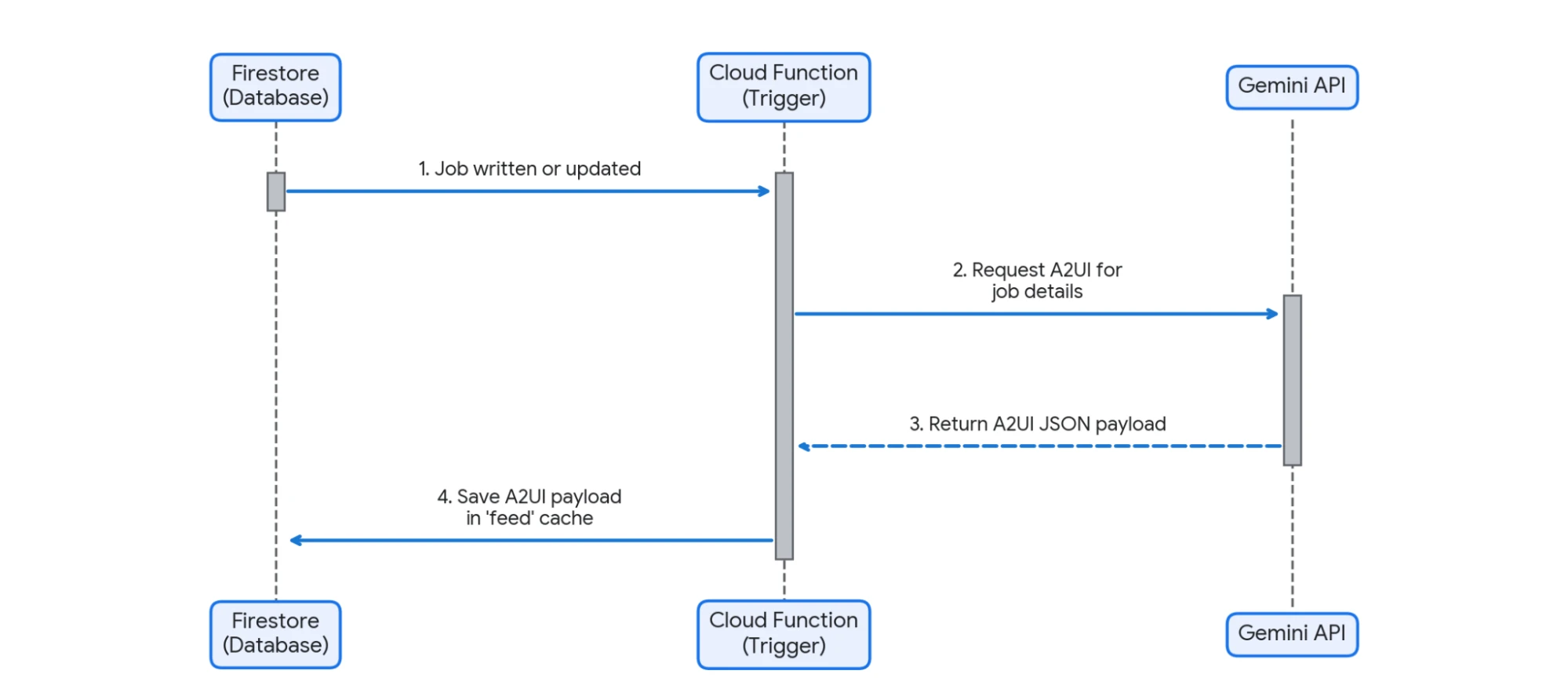
To solve the latency problem of generating this rich startup view, I decided to separate the process of generating the initial UI components from the client app's runtime lifecycle. Generating the UI asynchronously in the background whenever data changes allows the backend to cache the layout ahead of time, making it ready to load instantly at startup.
Here is what this background generation flow looks like:
When the user opens the Flutter app, I bypass the LLM entirely,
pulling the pre-computed UI straight from the database
and adding it to both my conversation history and the genui transport layer.
By decoupling these two phases, users get an instant startup experience,
but I still retain the absolute flexibility of a dynamic,
AI-generated interface.
Let's look at how I put this together.
1. Asynchronous UI generation on the backend
The first half of the solution lives on the server, and I'm using the new (and technically experimental!) Dart support in Firebase functions with a trigger. Whenever a catering job record changes, a function is kicked off. It retrieves the updated data, sends a prompt to Gemini to construct the UI, and writes the resulting JSON to a Firestore collection called "feeds:"
// functions/bin/server.dart
import 'package:commis_functions/src/content_generator.dart';
import 'package:firebase_admin_sdk/firebase_admin_sdk.dart';
import 'package:firebase_functions/firebase_functions.dart';
void main() {
final adminApp = FirebaseApp.initializeApp();
final firestore = adminApp.firestore();
runFunctions((firebase) {
// NOTE: Firestore triggers (like onDocumentWritten) are currently
// experimental in the Dart Cloud Functions SDK and are only supported
// when running within the Firebase Emulator Suite.
firebase.firestore.onDocumentWritten(
(event) async {
// Read the API key from the environment parameters
final apiKey = StringParam(
'GEMINI_API_KEY',
ParamOptions(
defaultValue: '',
label: 'Gemini API Key',
description:
'API key to use when accessing the Gemini Developer API',
)).value();
final jobId = event.params['jobId'];
final jobData = event.data?.after?.data();
// Ensure we actually have post-write data to process
if (jobData == null) {
print('Could not find post-write job data.');
return;
}
final jobBuffer = StringBuffer();
// ...
// A whole bunch of lines that turn the job's properties into text for
// the agent.
// ...
try {
final generator = ContentGenerator(apiKey);
// Via a class that encapsulates the call to the LLM, generate A2UI.
final message = await generator.generateFeed(jobData.toString());
if (message == noUiSentinel) {
// Delete the cached document if the event is no longer upcoming
await firestore.collection('feed').doc(jobId).delete();
print('No UI generated; deleting feed for $jobId.');
return;
}
// Cache the generated A2UI message in the feeds collection
await firestore.collection('feed').doc(jobId).set({
'message': message,
});
print('Wrote feed for $jobId.');
} catch (e) {
print('Error generating UI: $e');
return;
}
},
document: 'jobs/{jobId}',
);
});
}
Inside that ContentGenerator class,
I've encapsulated a system instruction that includes the catalog from my app
(a series of instructions about which UI components can be generated
and what their properties are),
my choice of model (in this case, gemini-3.1-flash-lite),
and some other logic about what to return
if there's no UI to show for a particular job.
I also gave the LLM some stern instructions about what not to include, which in retrospect make it look like I'm yelling at it!
**RESPOND ONLY WITH A2UI MESSAGES FOR A NavigationCard OR "$noUiSentinel". NOTHING ELSE.**
**DO NOT INCLUDE ANY CONVERSATIONAL TEXT WHATSOEVER.**
**DO NOT INCLUDE ANY EXPLANATIONS OF WHAT YOU ARE DOING.**
Because this is a simple example for a demo, I'm being quite restrictive about what items from the catalog I want the agent to be able to create. That's not a requirement, though. You can give your agents your entire catalog and instructions telling them to go wild with creativity, or strip down the available choices to keep the guardrails close.
In this case, if a catering job is coming up soon
(say, in the next couple of days),
Gemini responds with a clean A2UI message that instructs the client
to display a map and navigation details.
If the event is further out,
it returns my sentinel string "NO GENERATED UI",
prompting the function to clear out the feed for that job.
With this in place, I've got a steady Firestore collection full of pre-generated cards for the user's jobs, which means my app is ready to display generated UI without waiting for a model!
2. Consuming cached UI in Flutter
On the client side, the goal is simple: fetch the pre-generated A2UI messages from Firestore and get them on screen.
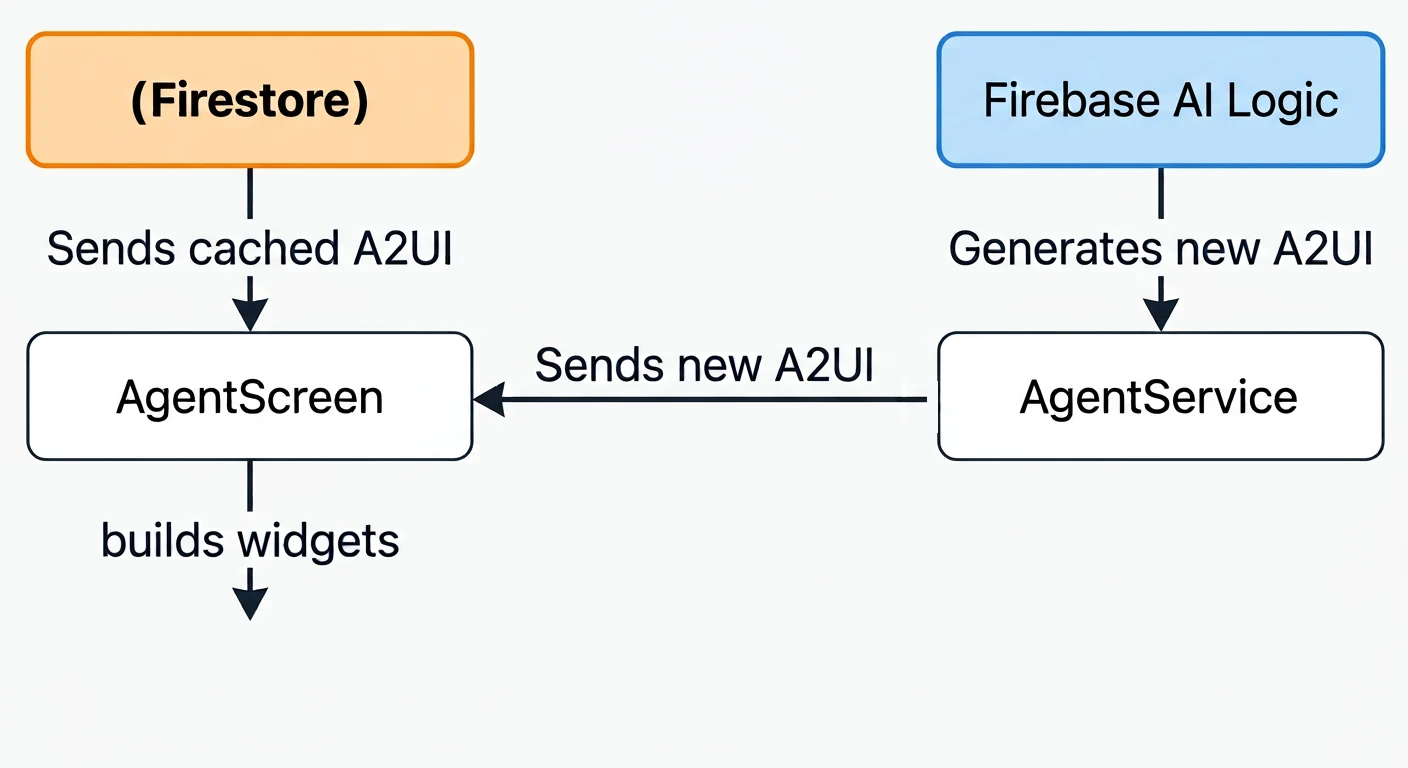
I hook this up during the initialization of my agent screen:
Future<void> _initAgent() async {
// This repository is a class I use to hide away queries to Firebase. It's
// really just grabbing values and providing a stream.
final repository = context.read<FirestoreRepository>();
String? feeds;
try {
// 1. Fetch active jobs and wait for their cached feed messages
final jobs = await repository.getJobs();
final feedFutures = jobs.map((job) => repository.getFeedMessage(job.id));
final results = await Future.wait(feedFutures);
// 2. Combine the non-empty cached A2UI messages
feeds = results
.map((r) => r?.trim() ?? '')
.where((r) => r.isNotEmpty)
.join('\n\n');
} catch (e) {
debugPrint('Error initializing agent: $e');
}
// 3. Initialize the agent session, passing the cached messages
_agentService = FirebaseAILogicService(
repository: repository,
catalog: _catalog,
cachedMessages: feeds,
);
// 4. Feed the cached messages directly to the transport adapter
if (feeds != null && feeds.isNotEmpty) {
_transport.addChunk(feeds);
}
setState(() => _isWaiting = false);
}
If this function finds cached A2UI messages, it sends them in two directions:
-
First, it provides them to my agent class,
AgentService. They're added to the system instruction ("These A2UI messages are already in place on the client...") so that the agent knows the initial state of the UI. -
Second, it feeds them into the GenUI transport layer via
addChunk(still my favorite method name in the entire package!). This ensures they're processed, the right surfaces are created, and the user sees the generated UI.
With both of those done, users can see their upcoming catering job cards and map UI on screen instantly—without having to wait for the LLM to think. Plus, subsequent chat messages from the user to the agent take place in a conversation with a full history of what's onscreen. If the user sees a navigation card for a job, they can say "Actually, change the date on that one to next Monday," and the agent will know which job they're looking at and edit the right one.
Generalizing the caching pattern
While my specific project relies on Firebase and Flutter, this pre-generation and caching pattern is adaptable to whatever backend stack you prefer:
-
Triggers and jobs: Generate UI directly from database write events, or run a periodic cron job to pre-bake UI for upcoming events.
-
Flexible storage: You don't need a heavy database. A fast key-value store, a simple cache table, or even static JSON files hosted on a CDN work perfectly.
-
Client agnostic: Any client app capable of handling A2UI (including those built with other frameworks!) can read these JSON payloads and render them on startup.
I've used a fairly simple example in this article. It doesn't tackle multi-user concerns or cache invalidation once an event wraps up, and I imagine no one is that interested in navigation help for an event that took place last weekend!
That said, I hope this sparks some ideas for the kinds of experiences you can build with offline-generated A2UI, and how you can create, combine, and use A2UI messages to get the best out of agentic applications.
Try it out!
Ready to build your first Flutter + A2UI application or try your hand at async patterns for GenUI?
-
Check out the official Intro to GenUI Codelab to learn the basics of Generative UI.
-
Explore the
flutter/demosrepository on GitHub to see the complete source code for the Commis chef assistant and other examples of Dart-driven GenUI patterns.
Happy building!
More from Flutter
How I converted GenLatte to fullstack Dart
And reduced the app's server bill

Quick, reliable calculations with A2UI's Client-Side Functions
Learn how client-side functions allow an agent to delegate local operations directly to Dart code running on a user's device.
