


Announcing A2UI 1.0 and a2ui_flutter
Faster, safer, more modular generative UI for Flutter


When an AI agent helps a user reason over data or take action inside an app, plain text is rarely the best interface. Nobody wants to hunt down numbers buried in a chat paragraph or type three follow-up messages just to confirm an update. Generative UI (GenUI) lets agents respond with real, interactive Flutter widgets tailored to the user's exact context in the moment.
Today, we're launching A2UI 1.0 and
a2ui_flutter,
the Flutter package formerly known as genui.
With 1.0, the protocol and SDK are tighter, faster,
and equipped with the structural guardrails production teams need,
on mobile, web, and desktop.
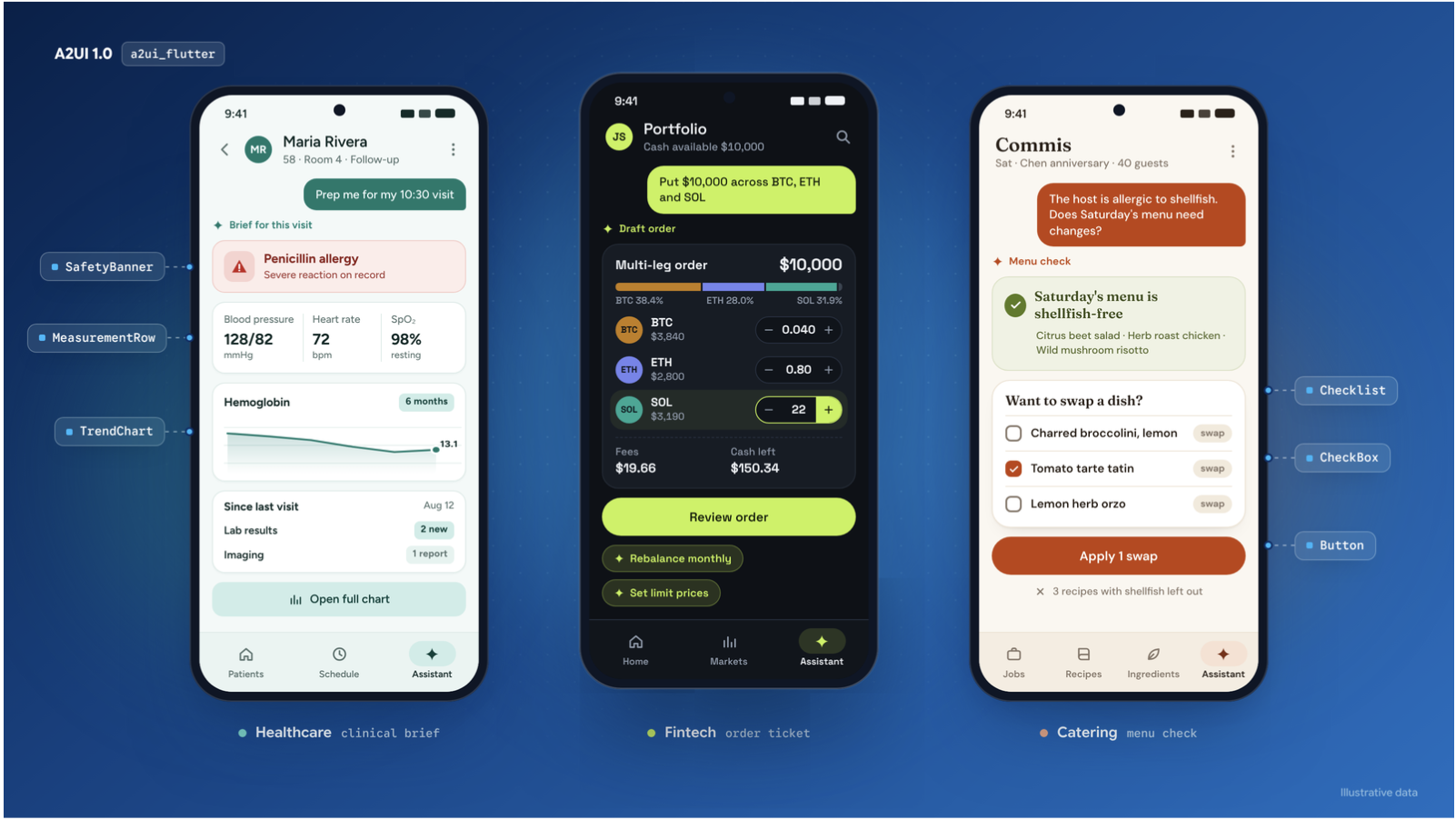
In this post, we'll look at how Generative UI earns its place alongside traditional Flutter screens, walk through what's new in A2UI 1.0, and see how community partners such as Very Good Ventures, Solid Software, and Somnio Software are already putting these features to work in different industries.
Grounding GenUI: When to generate UI, and when deterministic widgets win
First, a rule of thumb: Generative UI isn't meant to replace your app's deterministic screens. Standard forms, lists, and navigation tabs are fast and predictable. If a static form already handles a workflow cleanly, sticking with deterministic UI is a great option.
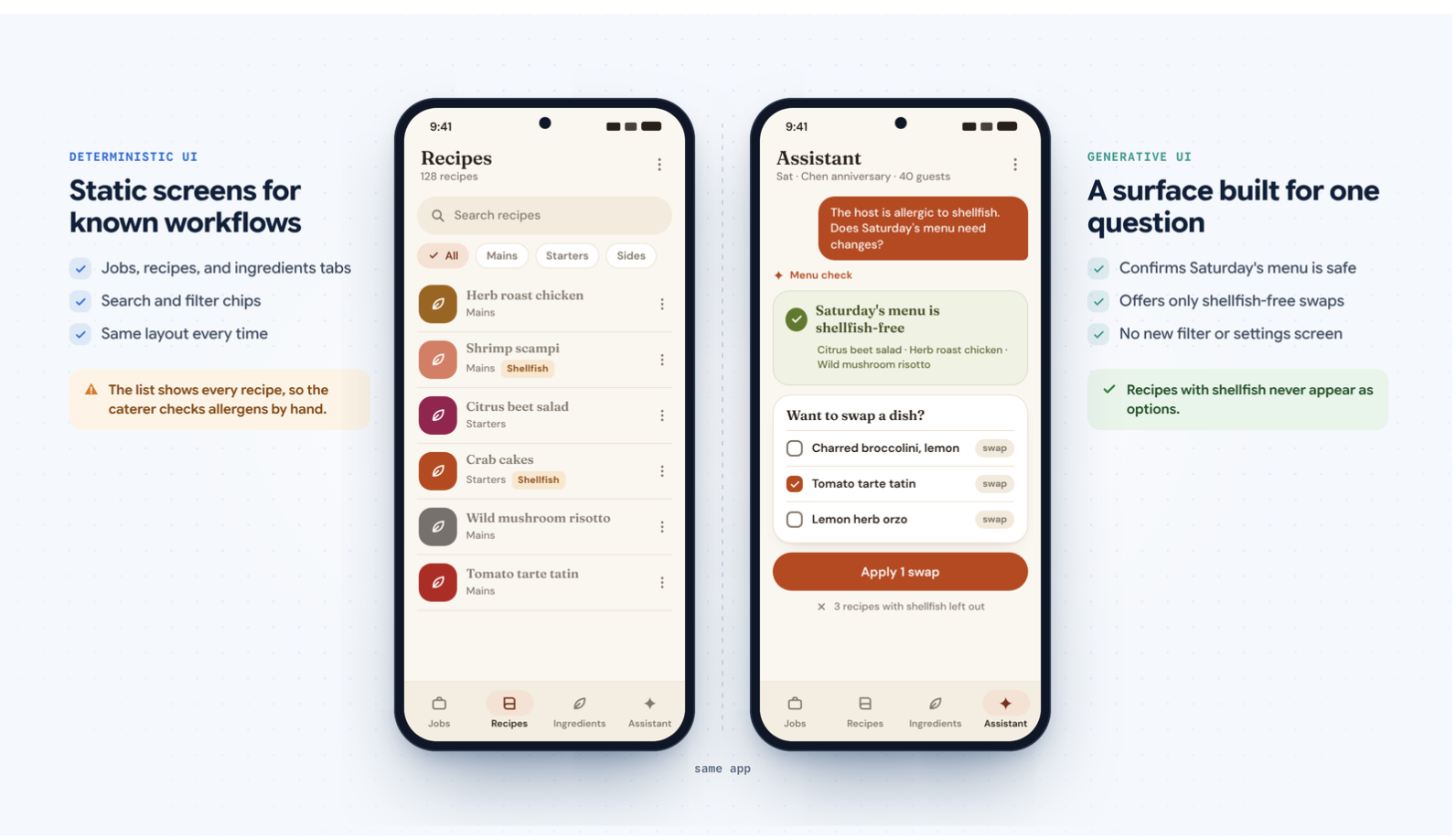
Generative UI shines when the right interface depends on reasoning over open-ended context. Take our Commis demo, a catering app that manages jobs, recipes, and ingredients. Ask whether a menu needs to change for a host who's allergic to shellfish, and the agent confirms the current menu is safe, then offers to modify it, showing only recipes without shellfish. The app needs no settings checkbox or shellfish search filter. Because the agent both reasons about the request and builds the UI, the user can switch up the menu with no chance of picking a shellfish dish.
From genui to a2ui_flutter: A simpler architecture
Moving to A2UI 1.0 let us align the Flutter package name
directly with the protocol (welcome, a2ui_flutter)
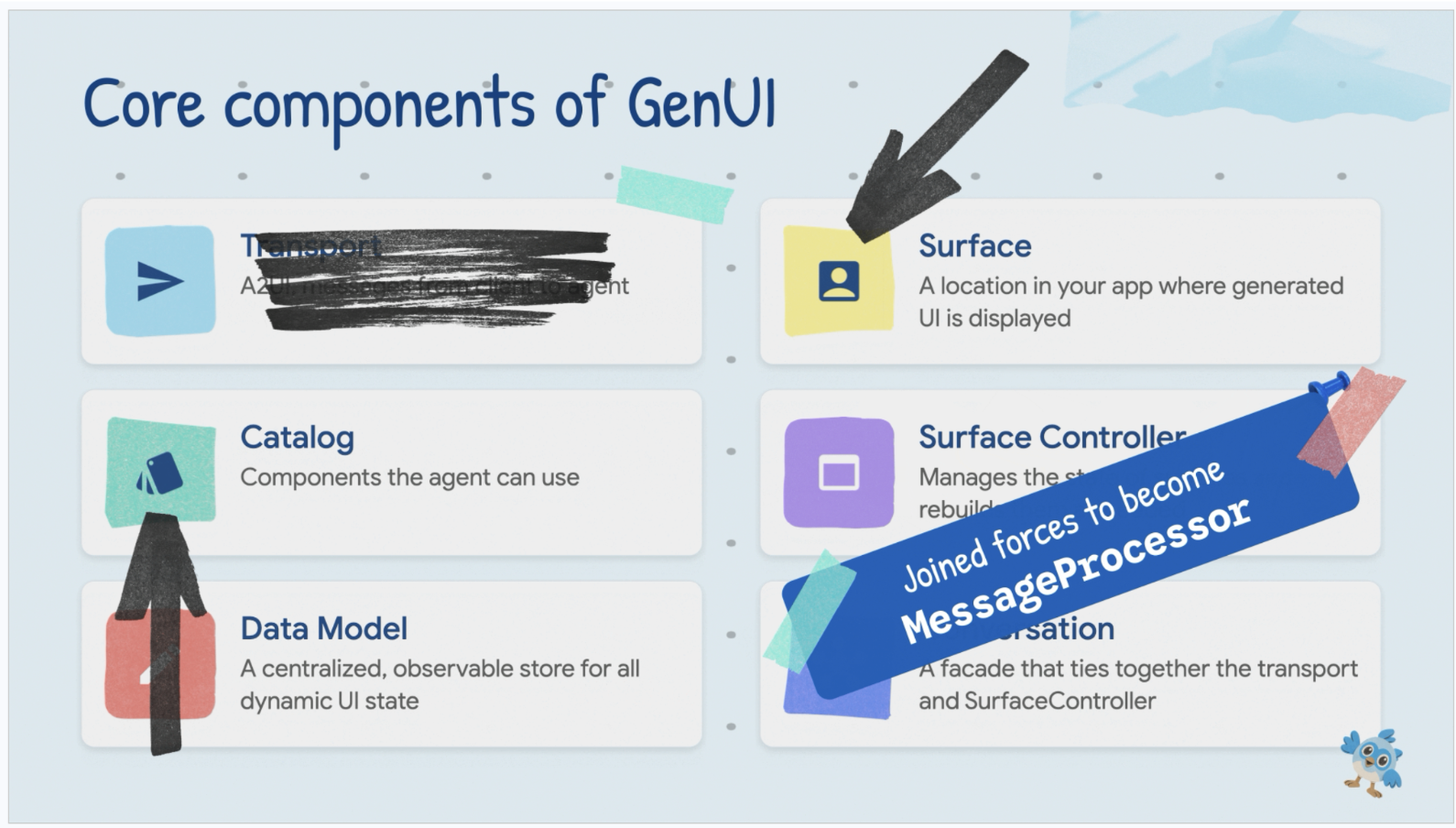
and consolidate the six concepts from earlier genui releases
into a leaner architecture:
-
Transportremoved: You're no longer locked into a package-specific transport abstraction, so you can use the streaming or HTTP setup you prefer. -
MessageProcessorreplacesSurfaceController + Conversation: One central class now handles catalogs, validates incoming A2UI messages, and manages surface state. -
Catalog,Surface, andData Modelrefined: They now support hierarchy guardrails, multiple catalogs per surface, and extensibility metadata.
Let's look at the five biggest additions in A2UI 1.0.
1. Dual-layer guardrails with allowedParents and allowedChildren
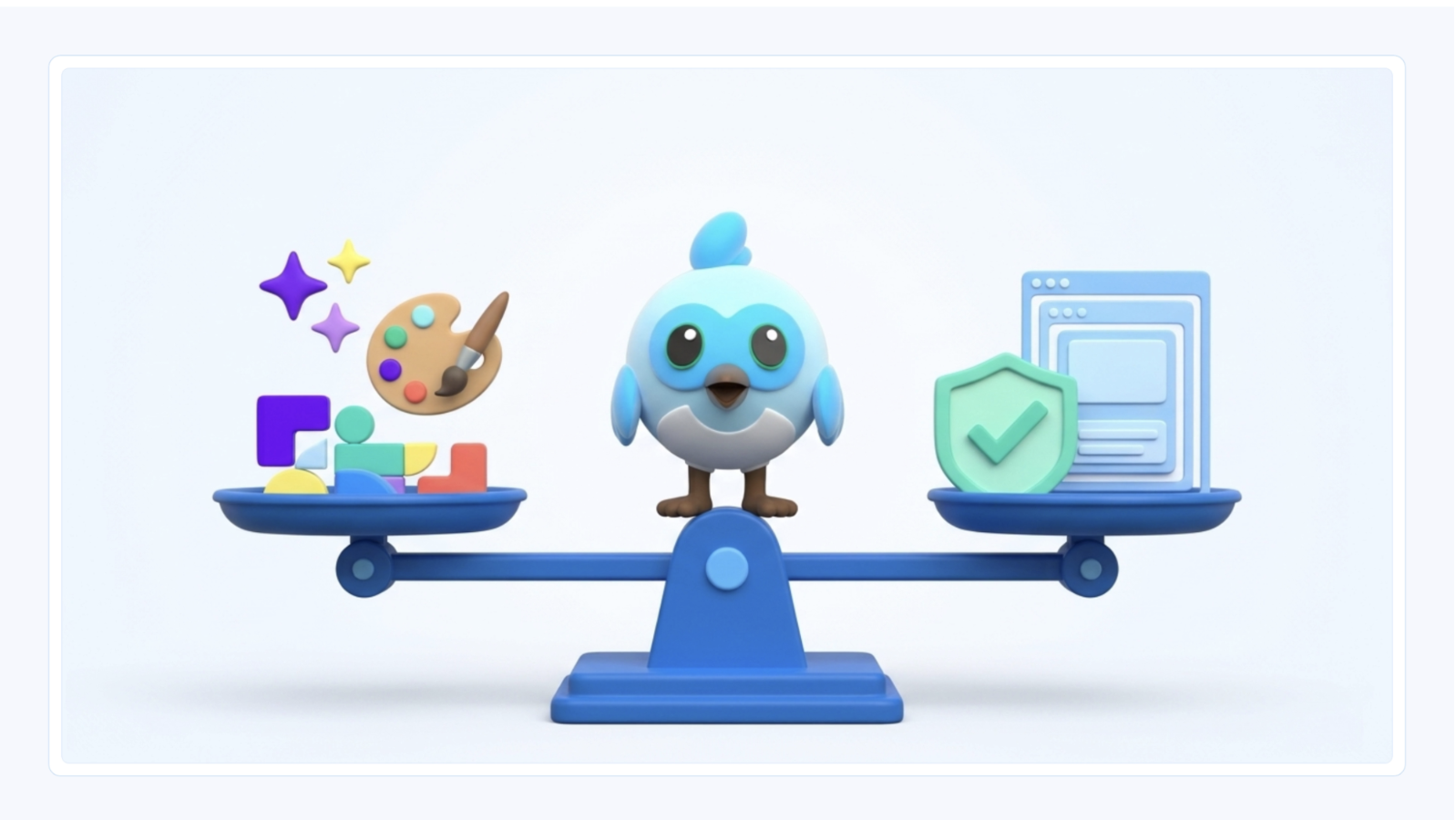
Give an agent too little freedom, and it can't adapt to your users;
give it too much, and it might notice that a Button accepts
a child and decide to stuff a DataTable inside it.
A2UI 1.0 solves this with allowedParents and allowedChildren
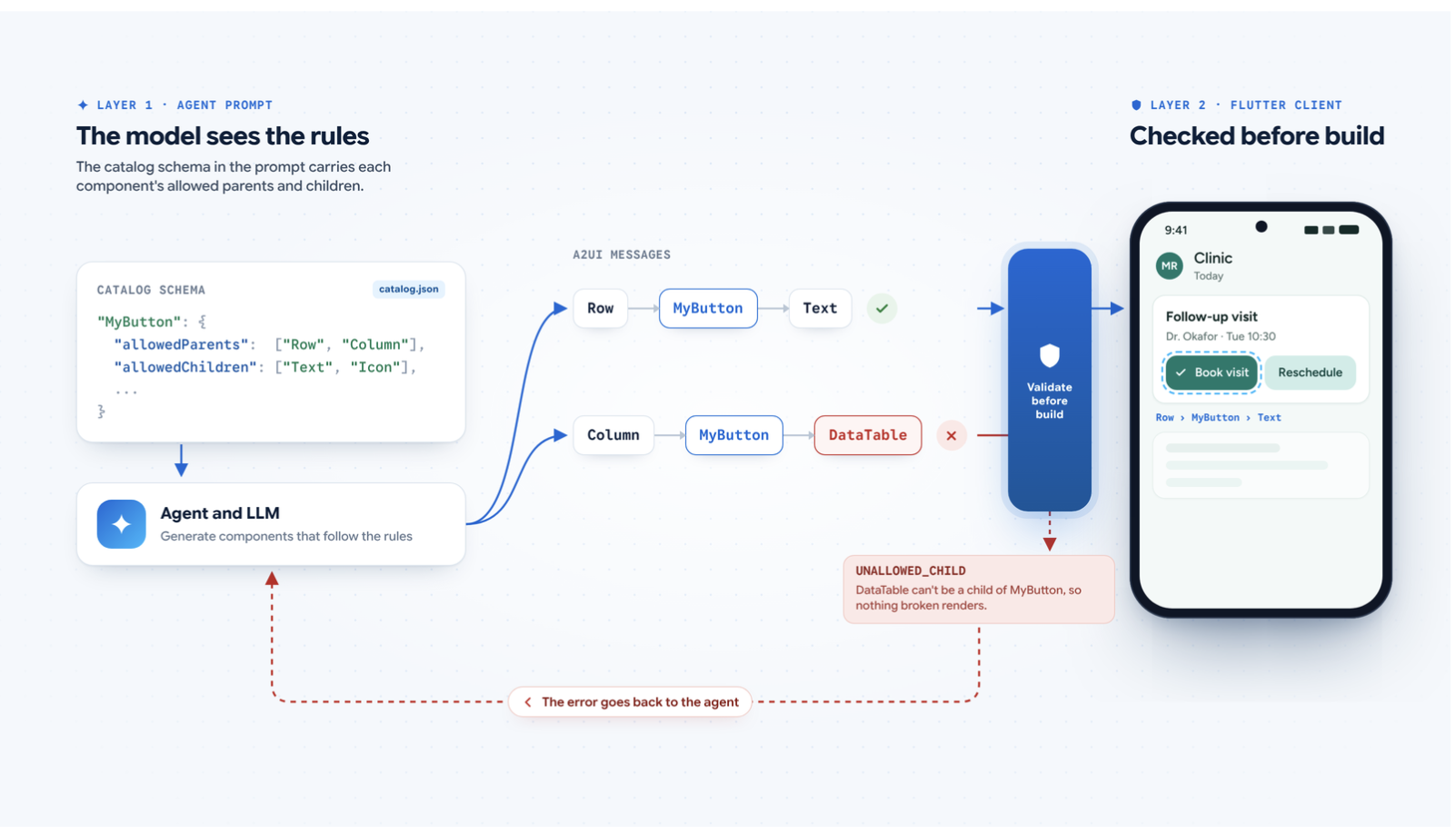
in your catalog schema. These properties act as dual-layer
guardrails: they're part of the catalog schema in the agent's prompt,
so the LLM knows valid nesting rules upfront,
and they're enforced on the client before widgets are built.
{
  "MyButton": {
    "type": "object",
    "allowedParents": ["Row", "Column"],
    "allowedChildren": ["Text", "Icon"],
    "properties": {
      "component": { "const": "MyButton" },
      "child": {
        "$ref": "common_types.json#/$defs/Child",
        "description": "The label or icon displayed inside the button."
      }
    }
  }
}
If an LLM still slips up and returns an invalid hierarchy,
a2ui_flutter catches the validation error rather than crashing
or rendering broken UI, and notifies the agent that the
component can't be rendered as described,
with an UNALLOWED_PARENT or UNALLOWED_CHILD error.
2. Faster UI generation with the Express inference format
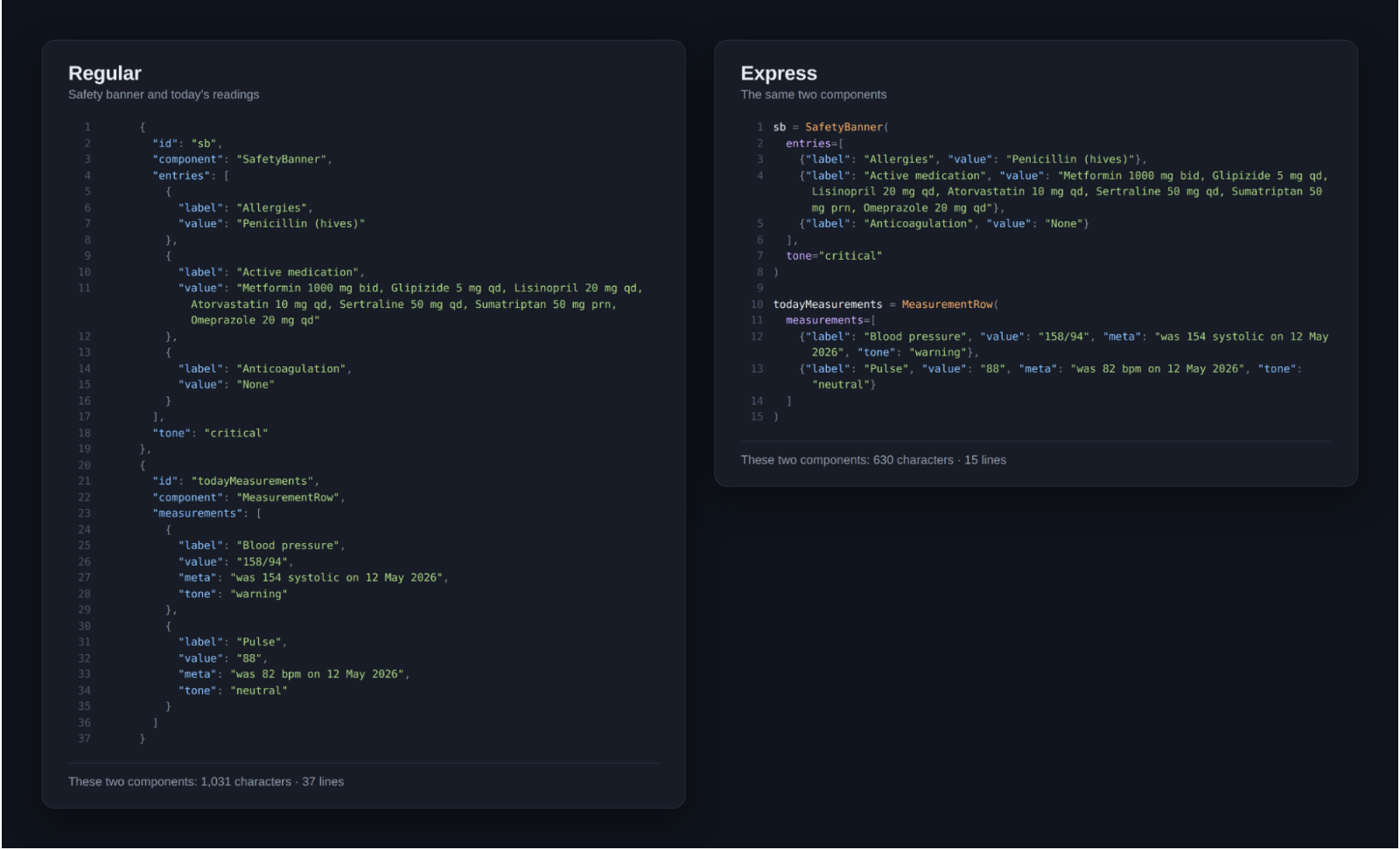
When an agent streams an interface in real time, every output token adds latency. Standard JSON carries heavy syntactic overhead, including repeated quotes, braces, id keys, and "component" discriminators. New in A2UI 1.0, the Express inference format represents the exact same component tree in a compact, function-call syntax, cutting character and token counts dramatically so models can generate surfaces much faster. In the following example, Express describes five components in 46% fewer characters than minified JSON, which means fewer tokens for the model to generate.
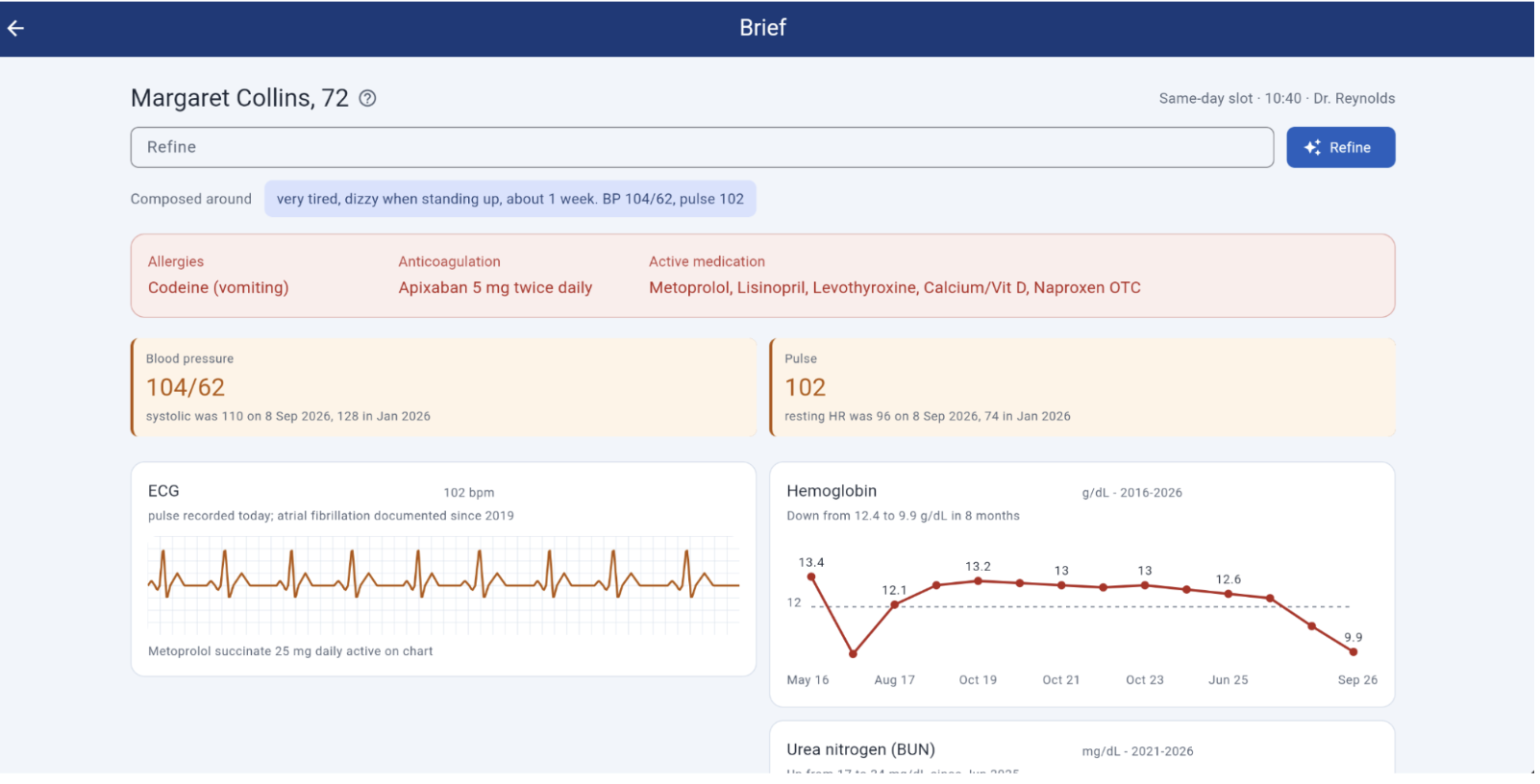
Solid Software put Express to the test in GenUI Clinic, a Flutter healthcare prototype that composes personalized, read-only clinical briefs from a patient's medical history and visit reason so providers don't lose time digging through records. Because the agent only selects widgets and can't alter underlying clinical data, the output stays safe and predictable while clinicians refine the dashboard mid-exam. Their team found that switching to the Express format cut full-screen dashboard generation from 10 seconds down to 5 seconds, making real-time clinical data retrieval feel practical for future projects.
3. Modular design systems with Multiple Catalogs
In A2UI 0.9, each Surface was locked to a single Catalog,
forcing teams to manually merge core UI components with
feature-specific widgets. In A2UI 1.0, one surface can mix
components from multiple catalogs
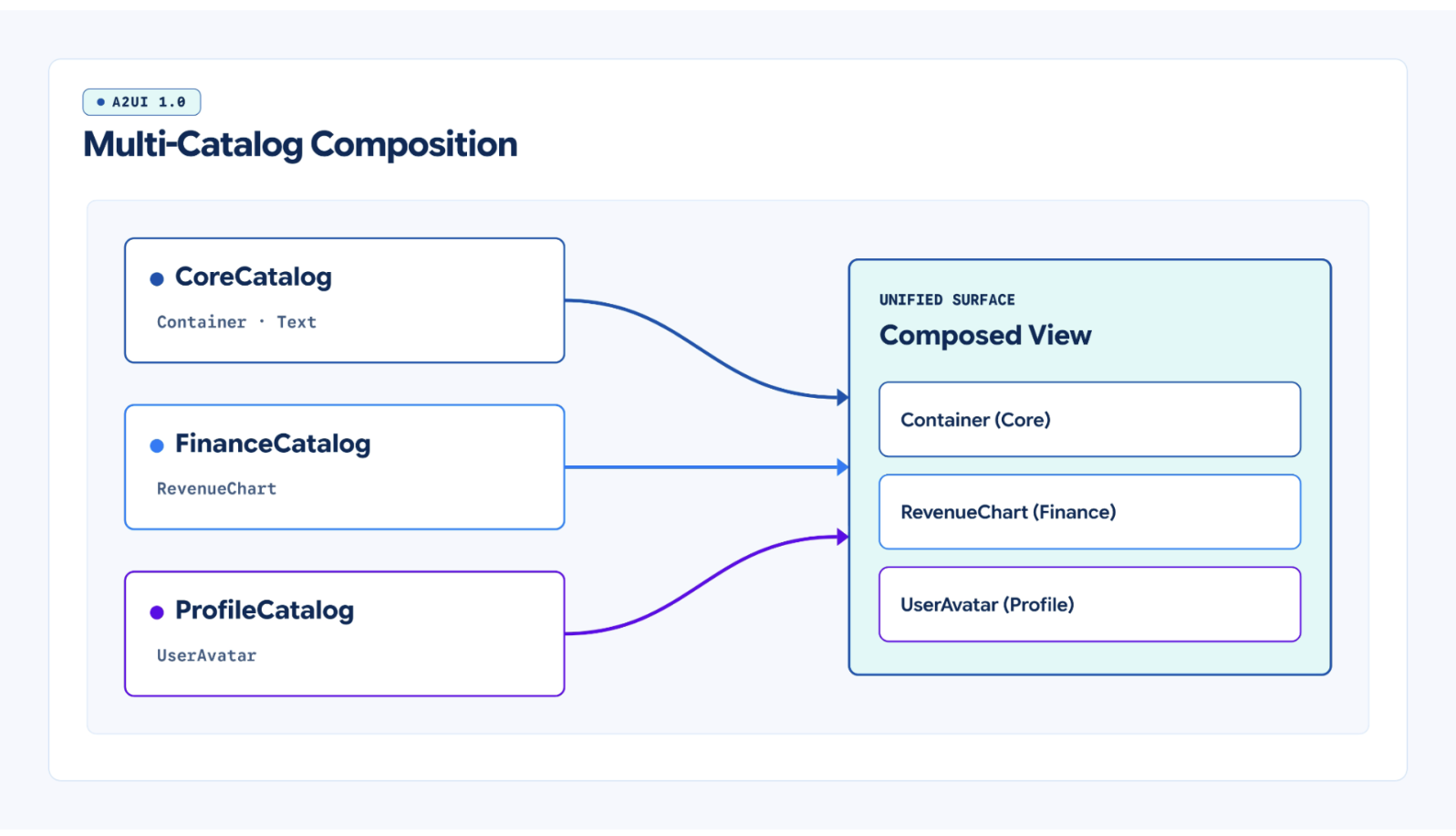
In Flutter, just pass a list of catalogs when creating
your MessageProcessor:
final processor = MessageProcessor(
  catalogs: [
    CommonCatalog(),
    HealthWidgetsCatalog(),
    CustomChartCatalog(),
  ],
  // ...
);
a2ui_flutter gives the LLM a unified schema and automatically
resolves component names across every registered catalog.
Core UI teams can maintain shared layout primitives while domain
teams independently publish specialized widget catalogs.
4. Direct UI-to-backend round trips with callAgentFunction
Not every tap inside a generated interface is a new open-ended question. Tapping a chart bar or a follow-up prompt chip warrants a new LLM turn, but adjusting a slider, stepper, or filter inside an existing card shouldn't wait several seconds for a round trip.
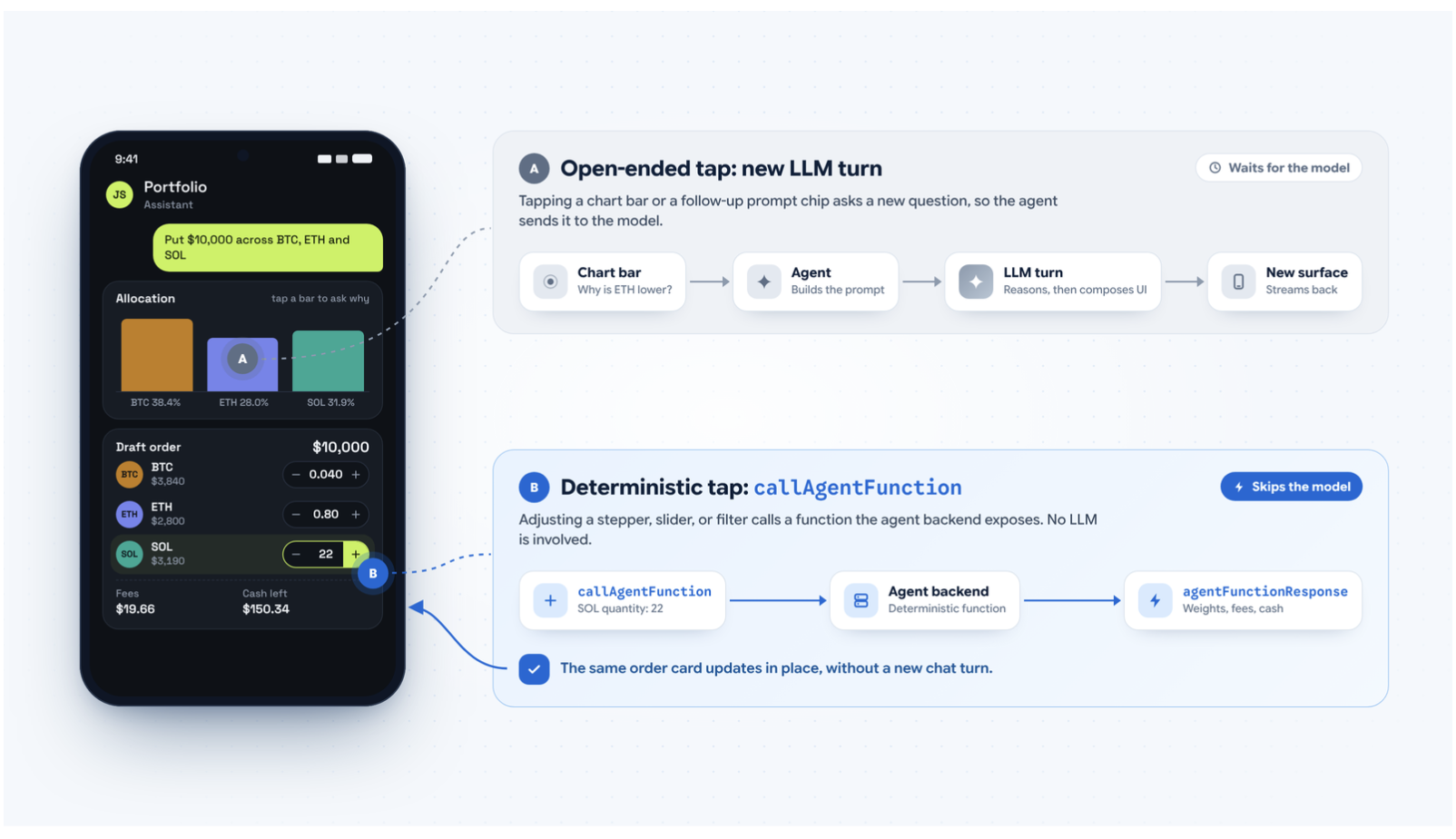
New in A2UI 1.0, callAgentFunction lets a rendered widget
invoke a deterministic function exposed by the agent backend directly.
The backend recomputes the result without involving the LLM,
and the updated data lands straight back in the existing component,
turning generated UIs from static snapshots of an answer into
interactive tools.
Somnio Software built their open-source portfolio companion
around this exact distinction. After filtering eight candidate
ideas down to the three that beat a static form
(portfolio attribution waterfalls, tax-lot impact tables,
and multi-leg order drafting),
CEO Mauricio and his team used callAgentFunction to keep
every calculation deterministic and fast.
When a user drafts a diversified $10k order across
BTC, ETH, and SOL and taps + on a stepper to adjust
leg quantities, the order ticket calls the backend directly
via callAgentFunction, updating weights, fees, and remaining cash
in-place in under a second without opening a new chat turn.
5. Observability and customization with Extensibility Metadata
Production apps often need to pass structured out-of-band data alongside A2UI messages, such as routing flags, styling hints, security context, or correlation tokens that tie multi-agent backend logs to mobile telemetry.
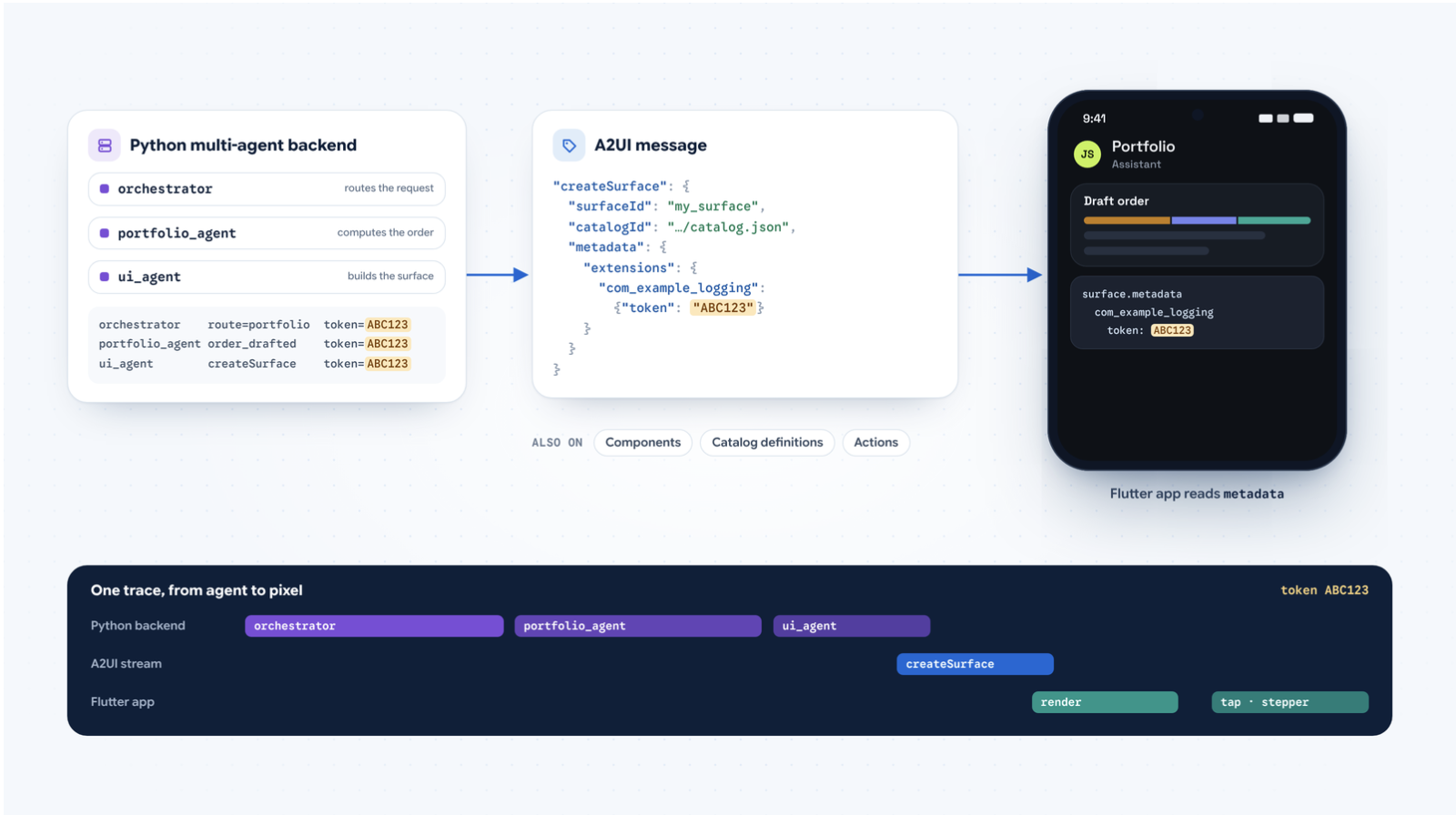
A2UI 1.0 supports extensibility metadata on surfaces, individual components, catalog definitions, and actions. For example, when constructing messages deterministically in Python, pass your payload via metadata:
CreateSurface(
    surface_id="my_surface",
    catalog_id=(
        "https://example.com/catalog.json"
    ),
    metadata={
        "extensions": {
            "com_example_logging": {"token": "ABC123"}
        }
    },
)
Or, if your model outputs Express directly, attach extensions before sending the message:
part.a2ui = set_surface_extensions(
    part.a2ui,
    extensions={"com_example_logging": {"token": "ABC123"}},
)
Both the agent and client SDKs handle serialization and parsing automatically. On the Flutter client, read the metadata getter on your surface or component model to retrieve your data.
Build the agent in Dart, Python, or TypeScript
a2ui_flutter renders the UI. On the agent side,
an A2UI agent SDK teaches the model your catalog,
compiles its output (including Express) into A2UI messages,
and validates them before they reach the app.
Agent SDKs are available in three languages,
and any of them can drive the same Flutter app:
- Dart (new):
a2ui_agent -
Python:
a2ui-agent-sdk, plusa2ui-adkfor Google ADK anda2ui-a2afor the A2A protocol - TypeScript:
@a2ui/agentfor Node.js
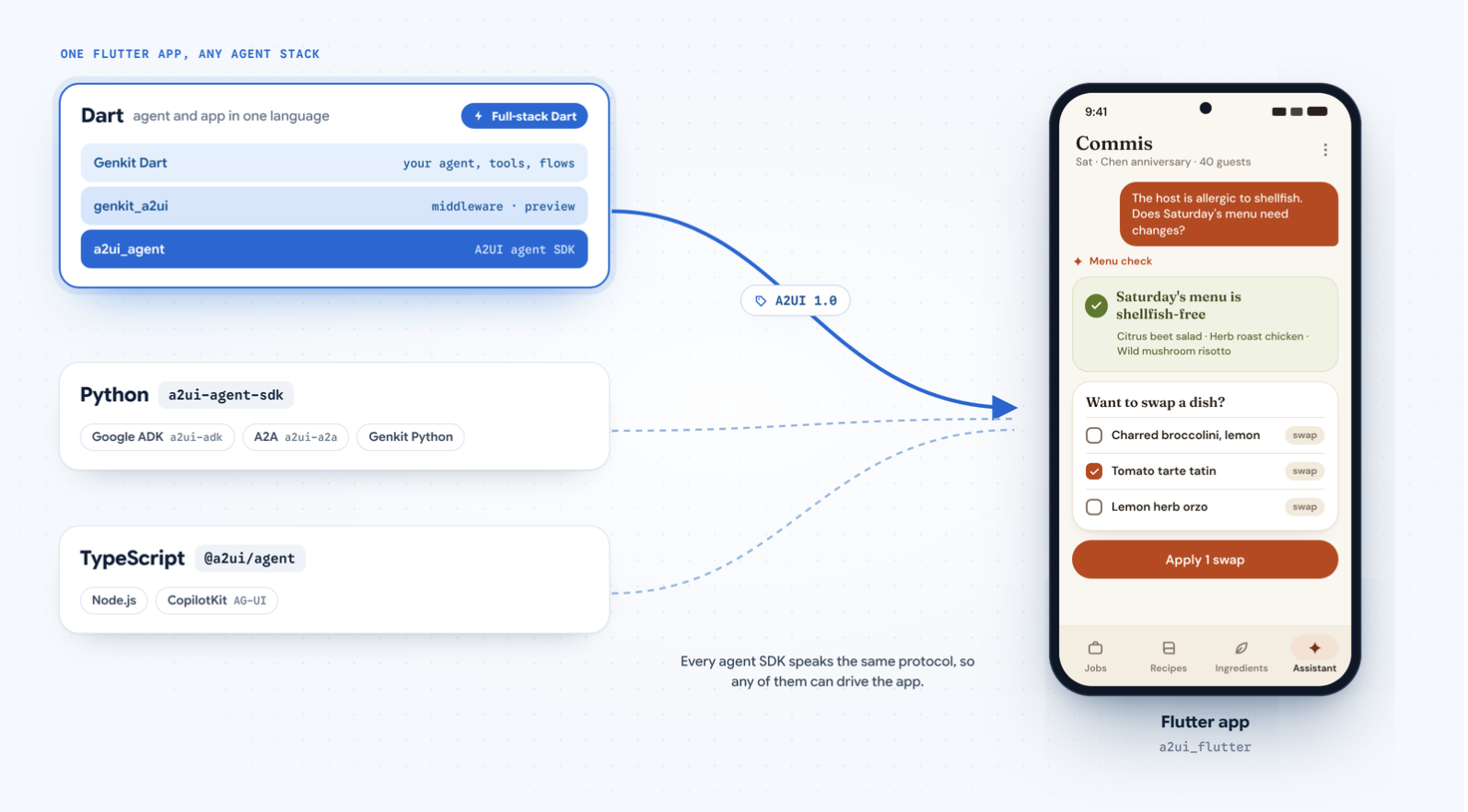
For a full-stack Dart app, pair a2ui_agent with
Genkit Dart,
Google's open-source framework for building agentic apps
with Dart and Flutter. Its genkit_a2ui middleware,
currently in preview, builds on a2ui_agent,
so you can write the agent, its tools,
and the Flutter UI in one language.
Very Good Ventures used this stack for an
open-source smart home panel
that composes a different dashboard for each family member.
Its Dart Frog backend runs a2ui_agent and Genkit Dart,
turns speech into text with Gemini Live,
and sends A2UI 1.0 messages to the a2ui_flutter app
on a kitchen wall display. Try the
live demo.
Summary
With A2UI 1.0 and a2ui_flutter, you get a tighter,
faster foundation for building agent-driven Flutter experiences,
complete with more guardrails, faster generation via the Express format,
modular multi-catalog surfaces, sub-second interactivity
with callAgentFunction, and protocol-level extensibility metadata.
Are you ready to try it out?
- Start building: Check out the quickstart and protocol docs at a2ui.org.
- Explore sample code: Dive into Flutter AI and GenUI demos at g.dev/ai/flutter-demos.
We can't wait to see what you build!
More from Flutter
Announcing stable direct native interoperability
FFIgen for Objective-C and JNIgen for Java/Kotlin are now stable, and Pigeon puts them to work so your plugins can call native code directly


How I converted GenLatte to fullstack Dart
And reduced the app's server bill