


Build full-stack agentic UI with Dart, Flutter, and Genkit
Build an end-to-end dining concierge with Genkit Dart, A2UI, and Flutter, streaming validated native UI surfaces from a Dart server.

When an AI agent helps book a table, filter flights, or customize an order, interactive widgets beat typing back and forth in plain text. Generative user interfaces (GenUI) put native controls like date pickers, sliders, and confirmation cards right inside the conversation.
A2UI (Agent-to-User Interface) is Google's open protocol for agent-driven interfaces. Instead of returning raw text, an agent streams structured UI surfaces, and the client renders them with native widgets and sends user interactions back as events.
With Genkit Dart and A2UI, you can build full-stack apps with agentic UI in Dart and Flutter, from backend tools to interactive screens. This walkthrough builds an end-to-end dining concierge for Cymbal Bistro (refer to the complete sample on GitHub).
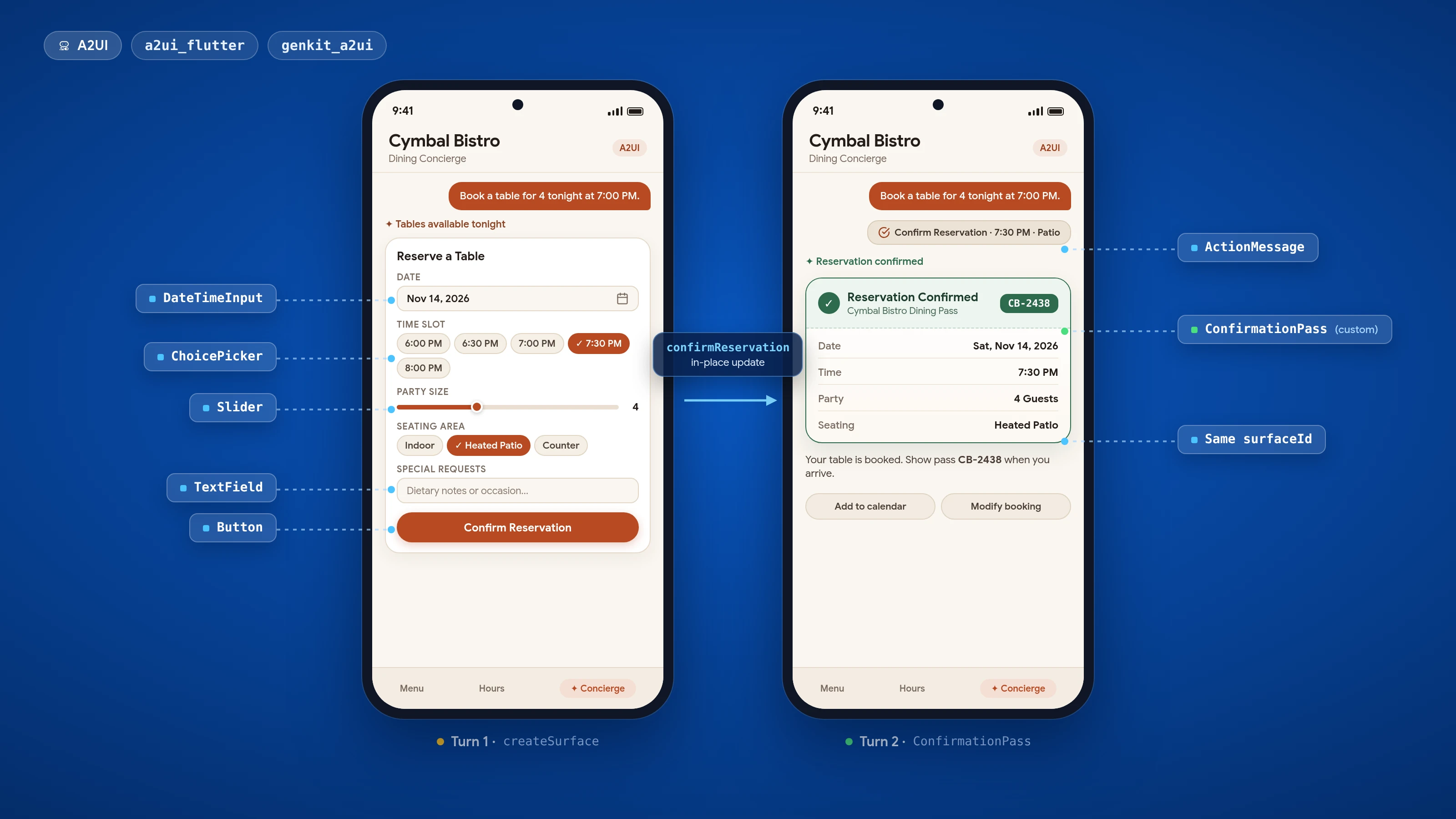
The Flutter client renders interactive A2UI surfaces as the Genkit Dart agent checks availability and confirms a booking.
Why build agentic UI with Genkit Dart
Genkit is Google's open-source framework for building AI workflows and stateful agents in Dart. When you pair it with A2UI, you get:
-
End-to-end Dart tooling: Define typed tool schemas in Dart,
keep multi-turn state with
defineAgent, and stream responses to Flutter over HTTP withremoteAgent. - Swappable models and middleware: Switch between models from Google, Anthropic, OpenAI, and local providers behind one API, and attach the A2UI middleware without mixing UI formatting into your tool logic.
- Local UI inspection and testing: Preview generated surfaces, inspect component trees and bound data, and simulate clicks in the Genkit Developer UI before wiring up your Flutter screen.
How A2UI works in Genkit Dart
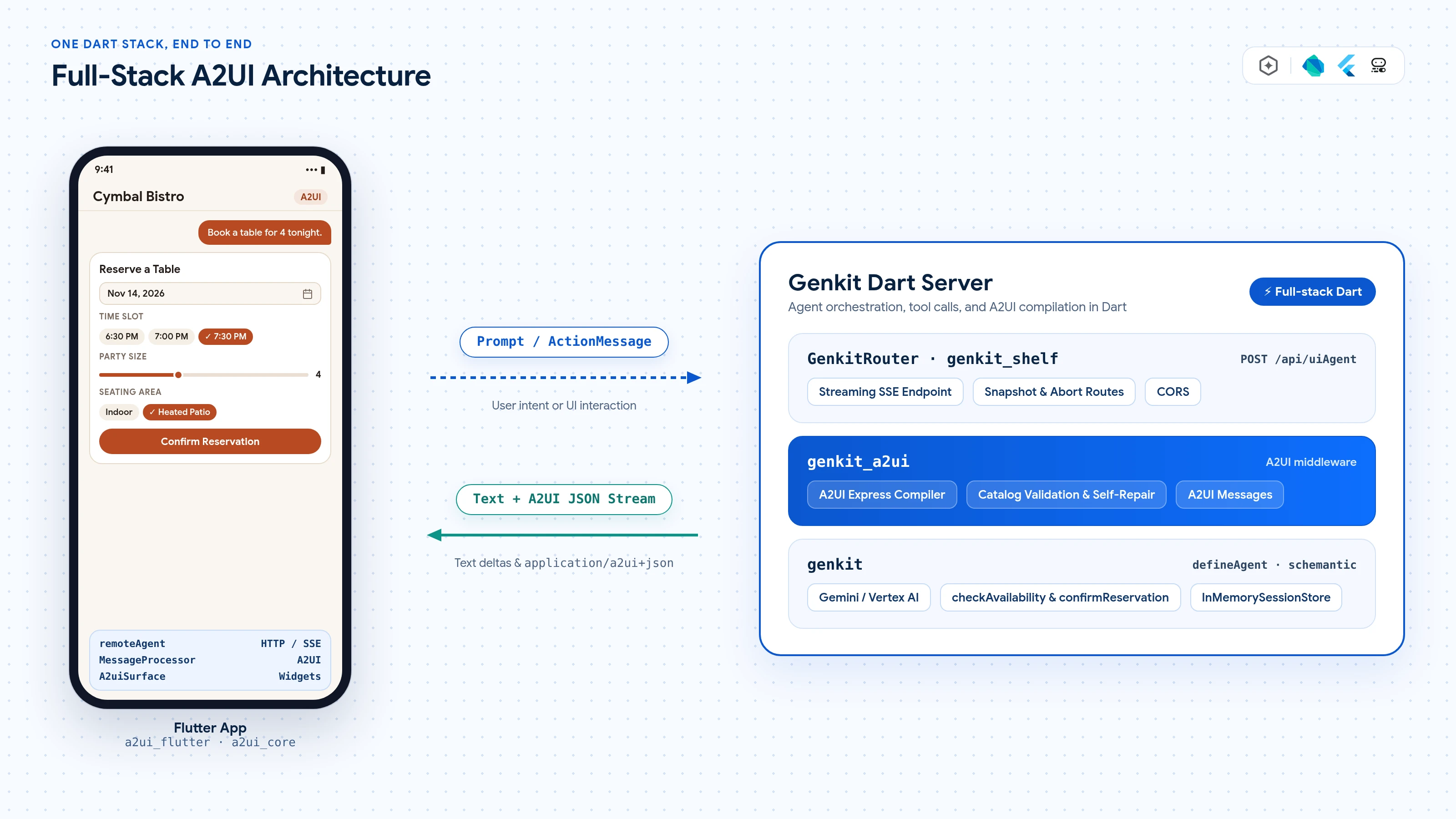
Genkit's A2UI integration coordinates dynamic UI between your server and Flutter app around three ideas:
-
An approved component catalog: You give the agent a catalog of trusted
widgets, starting with A2UI's 18-component Basic Catalog
(such as
Card,DateTimeInput,ChoicePicker,Slider,Tabs, andModal). Because the agent can only pick from components you approve rather than outputting raw HTML or scripts, your Flutter app stays in control of styling and security while API keys and backend mutations remain on the server. - Built-in A2UI 1.0 enhancements: The A2UI middleware uses the enhancements from A2UI 1.0, including A2UI Express by default, which cuts generated UI output roughly in half compared to raw JSON. Because the middleware compiles each block into standard A2UI JSON on the server, validates it against your catalog, and retries on errors, you get faster streaming and more reliable rendering.
-
In-place updates and action events: Every rendered surface has a
surfaceId. Your Flutter app renders each surface natively, updates an existing card in place whenever the samesurfaceIdarrives again, and sends button clicks or form submissions back to the server as structured action events.
Set up the full-stack project
To follow along, install Flutter (with Dart 3.12 or later)
and the Genkit CLI,
and set a GEMINI_API_KEY environment variable.
Calling Gemini models might incur usage charges beyond the free tier.
Keep the server and Flutter app in separate packages
(dart create server and flutter create client)
so backend middleware stays out of your client build,
then add their dependencies:
# Server package (server/)
dart pub add genkit genkit_a2ui genkit_google_genai genkit_shelf schemantic shelf shelf_router
dart pub add --dev build_runner schemantic_builder

# Flutter client package (client/)
flutter pub add genkit a2ui_flutter a2ui_core json_schema_builder url_launcher
Define the server-side agent
In this example, uiAgent powers a dining concierge for Cymbal Bistro.
When a diner asks for a table, uiAgent calls checkAvailability
and streams an interactive reservation card.
When the diner submits the booking, uiAgent calls confirmReservation
and swaps the form in place for a ConfirmationPass card.
Define the tool schemas, tools, and agent in server/lib/agent.dart,
attaching the A2UI middleware so the model can stream UI surfaces.
Run dart run build_runner build afterward to generate agent.g.dart:
// server/lib/agent.dart
import 'package:genkit/experimental.dart';
import 'package:genkit/genkit.dart';
import 'package:genkit_a2ui/a2ui.dart';
import 'package:genkit_google_genai/genkit_google_genai.dart';
import 'package:schemantic/schemantic.dart';
import 'shared.dart';
part 'agent.g.dart';
@Schema()
abstract class $CheckAvailabilityInput {
@Field(description: 'The restaurant name, e.g. Cymbal Bistro.')
String get restaurant;
@Field(description: 'The date for the reservation, e.g. tonight, tomorrow, or YYYY-MM-DD.')
String get date;
@Field(description: 'Number of guests.')
int get partySize;
}
@Schema()
abstract class $CheckAvailabilityOutput {
String get restaurant;
String get date;
int get partySize;
bool get available;
List<String> get availableSlots;
List<String> get seatingAreas;
}
// ConfirmReservationInput, ConfirmReservationOutput, and _resolveIsoDate omitted for brevity.
// Register plugins on the shared Genkit instance
final Genkit ai = Genkit(plugins: [googleAI(), A2uiPlugin()]);
// Tool 1: Check table availability and open time slots
final checkAvailability = ai.defineTool(
name: 'checkAvailability',
description: 'Checks table availability, open time slots, and seating areas for a restaurant.',
inputSchema: CheckAvailabilityInput.$schema,
outputSchema: CheckAvailabilityOutput.$schema,
fn: (input, _) async {
return .response(
CheckAvailabilityOutput(
restaurant: input.restaurant.isEmpty ? 'Cymbal Bistro' : input.restaurant,
date: _resolveIsoDate(input.date),
partySize: input.partySize,
available: true,
availableSlots: const ['6:00 PM', '6:30 PM', '7:00 PM', '7:30 PM', '8:00 PM'],
seatingAreas: const ['Indoor Dining', 'Heated Patio', 'Chef\'s Counter'],
),
);
},
);
// Tool 2: Confirm a reservation and issue a confirmation code
final confirmReservation = ai.defineTool(
name: 'confirmReservation',
description: 'Books and confirms a dining reservation, returning a confirmation code.',
inputSchema: ConfirmReservationInput.$schema,
outputSchema: ConfirmReservationOutput.$schema,
fn: (input, _) async {
final resolvedDate = _resolveIsoDate(input.date);
final seed = (resolvedDate.hashCode ^ input.time.hashCode ^ input.partySize).abs();
return .response(
ConfirmReservationOutput(
confirmationCode: 'CB-${1000 + (seed % 9000)}',
restaurant: input.restaurant.isEmpty ? 'Cymbal Bistro' : input.restaurant,
date: resolvedDate,
time: input.time,
partySize: input.partySize,
seatingArea: input.seatingArea ?? 'Indoor Dining',
specialRequests: input.specialRequests ?? 'None',
status: 'Confirmed',
),
);
},
);
// Define the stateful agent with the a2ui middleware attached
final uiAgent = ai.defineAgent(
name: 'uiAgent',
model: googleAI.gemini('gemini-4-hydrogen'),
system:
'You are the dining concierge for Cymbal Bistro. Keep text responses brief.\n'
'Use checkAvailability before rendering a reservation card, and use '
'confirmReservation when the user submits their booking to replace the '
'same surface with a ConfirmationPass card showing their confirmation code.',
tools: [checkAvailability, confirmReservation],
use: [a2ui(catalog: bistroCatalogId, validate: 'warn')],
store: InMemorySessionStore(),
);
Here, bistroCatalogId points to the custom catalog defined in
Extend the component catalog.
If you only need the 18 built-in components, omit the catalog argument.
For Google Cloud deployments, swap googleAI for the
Vertex AI plugin
and call vertexAI.gemini('gemini-4-hydrogen').
Serve the agent over HTTP
Expose uiAgent over HTTP in server/bin/server.dart.
GenkitRouter automatically mounts the streaming, snapshot,
and cancellation routes on a Shelf router:
// server/bin/server.dart
import 'package:genkit/experimental_io.dart';
import 'package:genkit/io.dart';
import 'package:genkit_shelf/genkit_shelf.dart';
import 'package:shelf/shelf_io.dart' as io;
import 'package:shelf_router/shelf_router.dart';
import 'package:a2ui_reservations_server/agent.dart';
Future<void> main() async {
await registerCatalogs();
// Mounts /uiAgent, /uiAgent/getSnapshot, and /uiAgent/abort
final genkit = GenkitRouter()..addAgent(uiAgent);
final app = Router()
..mount(
'/api/',
genkit.asShelfHandler(
cors: const CorsOptions(
allowedHeaders: ['Content-Type', 'Accept', 'X-Genkit-Stream-Id'],
),
),
);
await io.serve(app.call, 'localhost', 8080);
}
Render streaming surfaces in Flutter
In client/lib/main.dart, remoteAgent streams responses from your server
while MessageProcessor turns incoming A2UI payloads
into live A2uiSurface widgets.
The two wire helpers (a2uiMessagesFrom and a2uiActionToMessage) live in
client/lib/a2ui_helpers.dart in the
sample repository:
// client/lib/main.dart
import 'package:a2ui_core/a2ui_core.dart';
import 'package:a2ui_flutter/a2ui_flutter.dart';
import 'package:flutter/material.dart';
import 'package:genkit/experimental_client.dart';
import 'a2ui_helpers.dart';
import 'catalog.dart';
class _ChatPageState extends State<ChatPage> {
late final AgentApi _agent = remoteAgent(
url: 'http://localhost:8080/api/uiAgent',
getSnapshotUrl: 'http://localhost:8080/api/uiAgent/getSnapshot',
abortUrl: 'http://localhost:8080/api/uiAgent/abort',
);
late final AgentChat _chat = _agent.chat();
late final MessageProcessor<ComponentImplementation> _processor =
MessageProcessor(
catalogs: [bistroClientCatalog],
unifiedOutbound: true,
outboundListener: _onRendererMessage,
onError: (error) => debugPrint('A2UI renderer error: ${error.message}'),
);
final List<String> _surfaceIds = [];
@override
void initState() {
super.initState();
// Track each created surface by surface.id; replacements with the same id
// update in place rather than appending a duplicate card.
_processor.model.onSurfaceCreated.subscribe((surface) {
if (!mounted) return;
if (!_surfaceIds.contains(surface.id)) {
setState(() => _surfaceIds.add(surface.id));
} else {
setState(() {});
}
});
_processor.model.onSurfaceDeleted.subscribe((_) {
if (mounted) setState(() {});
});
}
Future<void> _runTurn(AgentTurn turn) async {
await for (final chunk in turn.stream) {
// 1. Append streamed prose text deltas
if (chunk.text.isNotEmpty) {
_appendProseDelta(chunk.text);
}
// 2. Feed streamed A2UI messages into the MessageProcessor
for (final m in a2uiMessagesFrom(chunk.raw.modelChunk?.content)) {
try {
_processor.processMessages([m]);
} on Object catch (err) {
debugPrint('Failed to apply A2UI message: $err');
}
}
}
await turn.response;
}
Widget _buildSurface(String surfaceId) {
final surface = _processor.model.getSurface(surfaceId);
if (surface == null) return const SizedBox.shrink();
return A2uiSurface(key: ObjectKey(surface), surface: surface);
}
}
Handle interactive user actions
When a diner selects their options and clicks Confirm Reservation,
the renderer emits an ActionMessage with the bound form values.
Forward it to uiAgent as the next turn:
// client/lib/main.dart
Future<void> _onRendererMessage(RendererToAgentMessage message) async {
if (message is! ActionMessage || _busy) return;
// Forward the user's UI interaction back to the agent as the next turn
await _runTurn(_chat.sendStream(message: a2uiActionToMessage(message)));
}
On the wire, a2uiActionToMessage wraps the A2UI action payload
in a DataPart (application/a2ui+json):
{
  "messages": [
    {
      "version": "1.0",
      "action": {
        "name": "confirmReservation",
        "surfaceId": "cymbal-bistro-reservation",
        "sourceComponentId": "confirmBtn",
        "timestamp": "2026-11-14T00:29:44.755489Z",
        "context": {
          "restaurant": "Cymbal Bistro",
          "date": "2026-11-14",
          "time": ["7:30 PM"],
          "partySize": 4,
          "seatingArea": ["Heated Patio"],
          "specialRequests": ""
        }
      }
    }
  ]
}
uiAgent receives this event, calls confirmReservation,
and reuses the same surface ID to replace the booking form in place
with a ConfirmationPass card:
Extend the component catalog
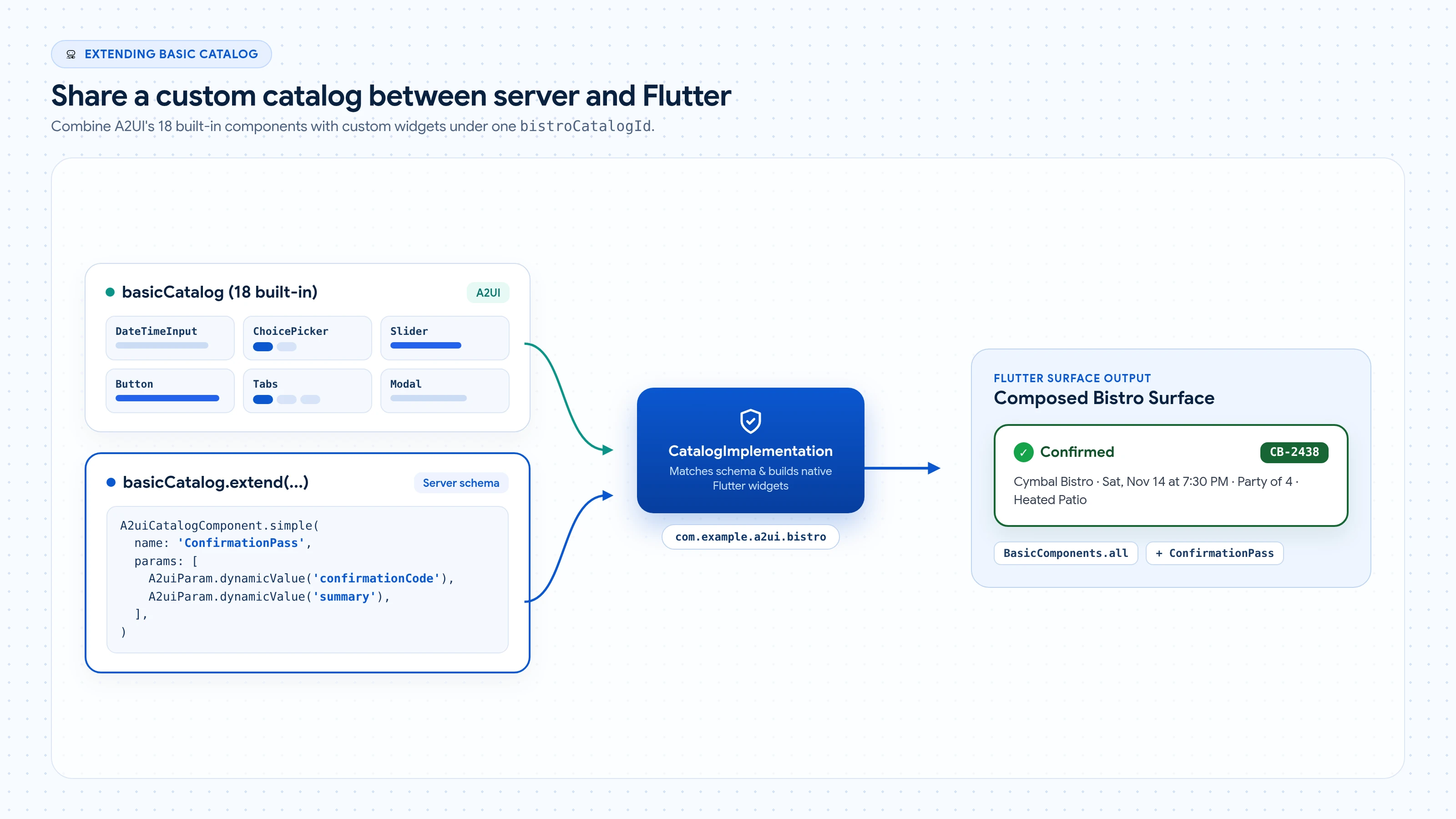
A2UI's basicCatalog covers 18 common layout, media, and input components
out of the box.
When you need custom brand or domain widgets, extend it on the server:
// server/lib/shared.dart
const String bistroCatalogId = 'com.example.a2ui.bistro';
// server/lib/agent.dart
final A2uiCatalog bistroCatalog = basicCatalog.extend(
id: bistroCatalogId,
components: [
A2uiCatalogComponent.simple(
name: 'ConfirmationPass',
description:
'Displays a highlighted dining confirmation pass with the booking '
'confirmation code and reservation summary once a table is booked.',
params: [
const A2uiParam.dynamicValue(
'confirmationCode',
required: true,
description: 'Reservation confirmation code, e.g. CB-4821.',
),
const A2uiParam.dynamicValue(
'summary',
required: true,
description: 'Formatted date, time, party size, and seating preference.',
),
],
),
],
);
Future<void> registerCatalogs() =>
loadCatalog(ai, id: bistroCatalogId, catalog: bistroCatalog);
On the Flutter client, register a matching Flutter widget
for ConfirmationPass alongside BasicComponents.all
under the same bistroCatalogId (refer to client/lib/catalog.dart
in the
sample repository):
You can also drop in existing domain catalogs from the A2UI ecosystem, such as the Google Maps Platform Agentic UI toolkit.
Inspect and debug A2UI workflows in the Developer UI
Start your Dart server under the Genkit CLI to test and inspect multi-turn A2UI workflows locally in the Genkit Developer UI:
genkit start -- dart run bin/server.dart
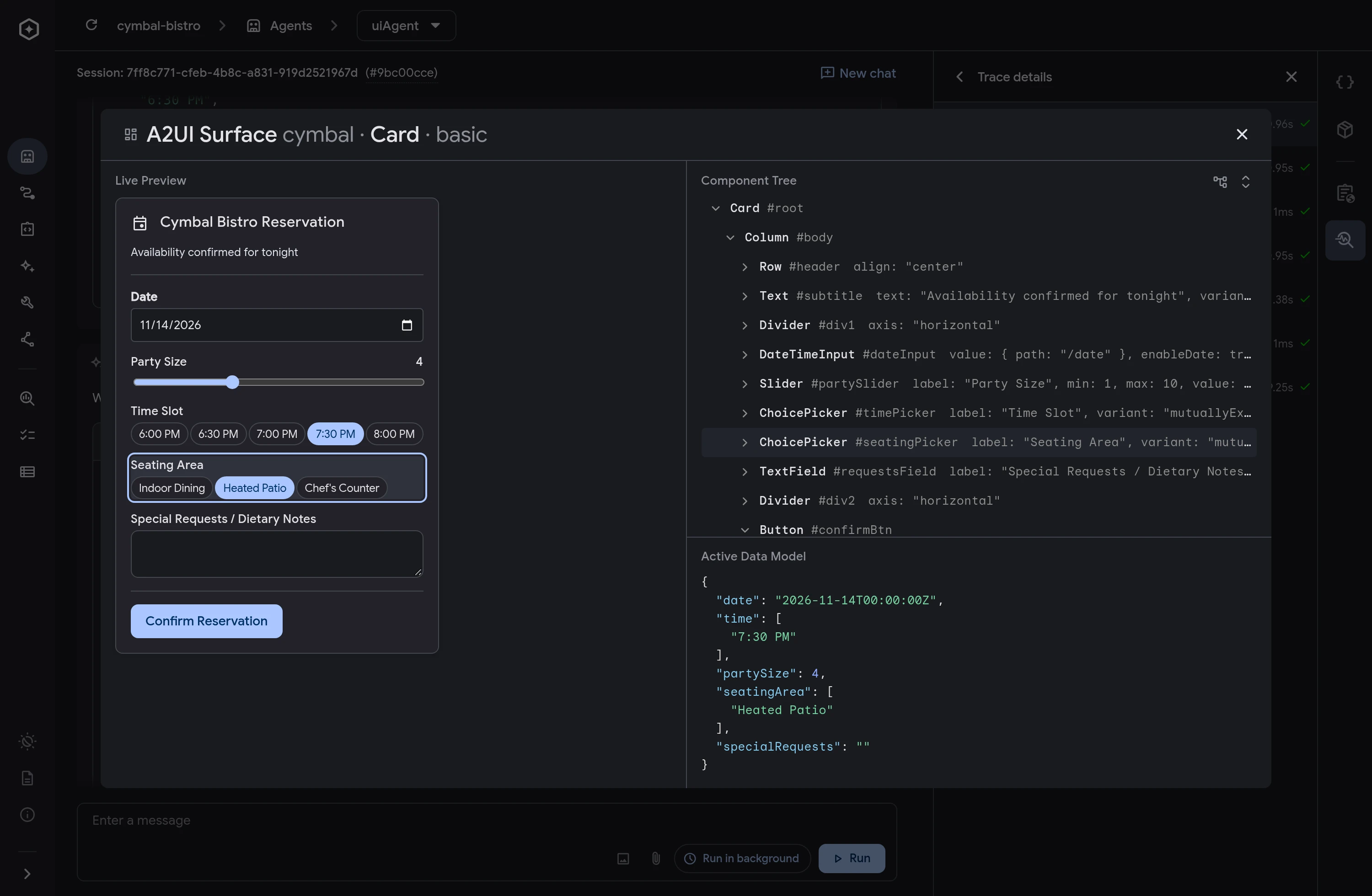
The Developer UI folds streamed UI blocks into interactive A2UI Surface cards so you can test multi-turn flows before wiring up Flutter. Click Inspect to open the A2UI Surface Inspector and view a live preview alongside the Component Tree, Active Data Model, and validation status.
You can also test interactions right in the browser by clicking preview controls or selecting Simulate Action to send custom action payloads back to the agent. For deeper debugging, step through tool calls in the Trace Viewer and check runtime logs in the Logs drawer.
What's next
With Genkit Dart, A2UI, and Flutter, you can build backend agents and stream native, validated UI surfaces across every platform from a single Dart codebase.
To explore further:
- Sample repository: Check out the complete Cymbal Bistro sample on GitHub.
- Genkit Dart documentation: Read the Genkit Dart A2UI guide and the Genkit Dart 1.0 announcement.
-
A2UI documentation: Explore
Announcing A2UI 1.0 and
a2ui_flutter, the A2UI 1.0 announcement, and the A2UI protocol specification. -
Pub packages: Browse
genkit,genkit_a2ui,a2ui_flutter, anda2ui_coreon pub.dev.
More from Flutter
Announcing A2UI 1.0 and a2ui_flutter
Faster, safer, more modular generative UI for Flutter


Announcing stable direct native interoperability
FFIgen for Objective-C and JNIgen for Java/Kotlin are now stable, and Pigeon puts them to work so your plugins can call native code directly